
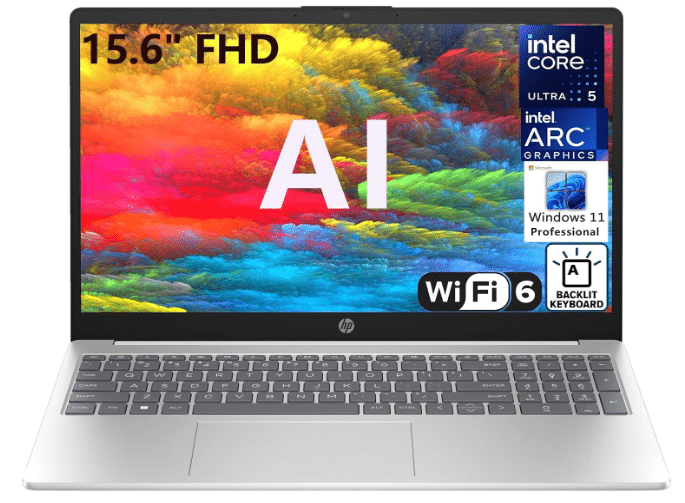
The HP 15 AI Laptop is positioned as an affordable yet highly versatile option for a wide range of users. Whether your daily routine involves simple tasks such as managing spreadsheets, sending emails, and working on cloud applications, or heavier workloads like 3D modeling, video editing, and running small business software, this machine can be configured to meet your needs.
For casual gamers, the HP 15 also provides enough power to run popular modern titles without breaking the bank.
A question many buyers might ask is, “Why invest in higher specifications if I only need a laptop for light tasks?” The answer lies in the HP 15’s flexibility; it comes in multiple configurations, allowing you to choose exactly the level of performance you need.
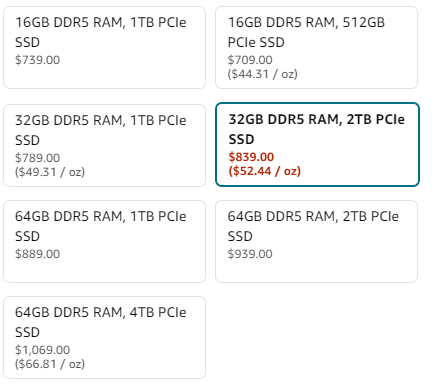
For example, If you primarily need a laptop for home office tasks, attending Zoom meetings, or managing a small business (e.g., pharmacy, auto dealership), you can choose:
- 16 GB DDR5 RAM
- 1 TB PCIe SSD
- Intel Arc Graphics
- Wi-Fi 6
This setup offers a near-instant startup, booting in about 2–4 seconds and can handle over 30 browser tabs at once without slowing down. A 1 TB SSD can hold roughly 200,000 high-resolution photos, 250 HD movies, or over 500,000 MP3 songs, enough for years of typical office or personal storage needs.
On the other hand, if your work involves more demanding tasks, you might opt for a model with:
- Intel 14-Core Ultra 5 125H CPU (faster than Intel i7-1370P)
- 64 GB DDR5 RAM
- 4 TB PCIe SSD
- Intel Arc Graphics
- Wi-Fi 6
With this configuration, you can edit a 10-minute 1080p video in under 3 minutes in Adobe Premiere Pro and run games like Fortnite at 60+ FPS on medium settings. The 4 TB SSD offers enough storage for roughly 1 million MP3 songs and 4,000 HD movies and could hold around 6.5 million document pages if they are typical office documents like PDFs and presentations, making it ideal for creatives and small businesses with large data libraries.
This versatility makes it a true all-in-one solution for laptop buyers. So, in a nutshell, the HP 15 AI laptop is really worth your money.
The HP 15 AI Laptop Specs:
- Display: 15.6″ HD
- HP AI Laptop CPU: Intel Core Ultra 5 125H, 14C (4P + 8E + 2LPE) / 18T, P-core 2.5 / 4.5GHz, E-core 1.2 / 3.6GHz, 18MB
- RAM: 32GB DDR5
- Storage: 2TB PCLs SSD
- Graphics: The 7-core Arc GPU
- USB Ports: 3
- Operating System: Windows 11
- Screen Resolution: 1920 x 1080 pixels
- Laptop Weight: 3.7 pounds
Its design and build quality:
First impressions are lasting, especially when it comes to your office environment. A sleek, modern laptop design not only enhances your team’s productivity but also leaves a strong branding impression.
The HP 15, with its elegant design and professional look, helps create a polished, professional atmosphere that leaves a positive impression on clients and employees alike.
The silver finish and the slim profile add up to make this laptop look far more expensive than what it costs. With a 15.6-inch display, this laptop weighs merely 5 pounds, meaning that it’s designed to be both portable and convenient to carry.
Whether you need to get to the office or just move around your house, it won’t weigh you down and will also save you some space in your bag.
Regarding Portability and Practicality:
This laptop is portable with a slimmer design and lighter structure, but will it last?
This is the latest model launched in July 2024, and it features a sturdy construction. While it’s made from ocean-bound and post-consumer recycled plastics, it appears to be crafted from high-quality recycled materials.
Regarding portability, it weighs just 3.7 pounds, making it easy to carry wherever you need to go.
HP 15 AI laptop’s display:
When it comes to laptop screens, it’s not just about size—it’s also about clarity, brightness, and how it performs in different lighting conditions.
Display-wise, the HP 15 comes with a 15.6-inch Full HD display and a resolution of 1920 x 1080 pixels, text is razor-sharp at 100 % scaling, and you can comfortably read for hours without zooming.
That’s the standard for most laptops in this price category, but it still delivers crisp, Netflix-grade visuals that make it really easy to read, stream, and work on this screen.
Its performance:
The HP 15 particularly stands out in performance, especially when you consider its price.
Inside, it houses an Intel 14-Core Ultra 5 125H, 32GB DDR5 RAM (or 64GB RAM), and a 2TB PCIe SSD (or up to 4TB PCIe SSD), along with the latest Arc Graphics.
When it comes to real-world performance, the Intel Core Ultra 5 125H shines. In Cinebench R23, it scores around 1,655 (single-core) and 12,620 (multi-core). This makes it well-suited for everyday tasks such as web browsing, document editing, video streaming, and office applications.
The new development of Arc Graphics has already helped Intel some share in the GPU market.
The 7-core Intel Arc iGPU handles light games well at moderate settings. For example, Fortnite runs around 50–70 FPS at 1080p low settings. Valorant (whose minimum GPU is only an Intel HD 4000 ) easily exceeds 60 FPS on low settings with this chip. Minecraft (being undemanding) can reach well over 60 FPS.
While it supports ray tracing, its performance in this area lags behind dedicated NVIDIA GPUs. It is important to manage expectations; while capable of an integrated solution, it is not designed to run the latest AAA games at maximum settings, where a dedicated graphics card would be necessary.
Additionally, Arc iGPU is suitable for tasks like casual gaming, video playback, and light creative editing. It performs better than older Intel integrated graphics and is more capable when in systems with dual-channel RAM as required for full performance. For serious creative workflows, rendering, 3D design, or intensive video production, a dedicated GPU (e.g., NVIDIA RTX series) is still the more efficient and reliable choice. Arc iGPUs are more of a step up from basic integrated graphics, not a full replacement for discrete solutions.
And about the RAM and Storage capacity, you are all sorted here. The 2 TB SSD is very roomy. Roughly speaking, it can hold on the order of 500,000 4 MB photos or about 1,000 hours of HD video. With 32 GB DDR5, the laptop can juggle many applications without paging. In practice, you could run dozens of Chrome tabs plus heavy apps (Excel, Zoom, etc.) simultaneously with no slowdown.
Tom’s Hardware notes that 32 GB is often recommended for “heavy multitaskers and prosumers. Students and professionals often need reliable responsiveness and multitasking.
It recommends at least a midrange CPU and 16 GB RAM for engineering students and this HP’s specs exceed that. Content creators benefit from 32 GB and a fast SSD for editing/3D work. Gamers using integrated graphics will find the performance on par with moderate settings as noted above.
So, whether you’re a regular user—be it a student, professional, or gamer—the HP 15 fulfills your needs amply and reasonably.
Keyboard:
When one spends hours typing on a laptop, a comfortable keyboard can make all the difference. The HP 15 has a full-sized keyboard with a numeric keypad, which is useful for people who deal with numbers frequently. The keys are well-spaced and have adequate travel, making typing comfortable for extended periods of time. Whether creating reports, drafting emails, or working on spreadsheets, the keyboard is responsive and simple.
However, the keyboard feels a little fragile, especially in the middle. If one really pushes on it too hard, sometimes it will even bend, which can be distracting. The trackpad is large and responsive, though not as smooth as in higher-end laptops. It is usable for simple tasks such as browsing the internet or going through documents, but if a user does a lot of intricate tasks, they might prefer using an external mouse.
Its battery Life:
One of the first things to consider when choosing a laptop is battery life, especially if you’re always on the go.
The HP 15 comes with HP Fast Charge, which enables it to charge from 0% to 50% in roughly under 45 minutes. It’s nice to have that capability when you are constantly on the go and need to top up your battery enough to last you through the day.
However, the general battery life is not very impressive. Under normal usage—browsing the web, working on documents, and streaming video—the HP 15’s battery lasts about 5 to 7 hours.
That’s average for a laptop in this price range but not quite up to par with more premium ultrabooks, which can reach 10 hours or more on a single charge. If you’re someone who needs all-day battery life without having to recharge, this might be an issue.
Regarding connectivity:
The HP 15 AI laptop features a combination of WiFi 6 and Bluetooth 5.3, significantly enhancing connectivity and performance. Whether you’re using it for work, gaming, or leisure activities, this combination allows for a seamless experience with improved speed, range, and efficiency.
The HP 15 AI has a solid selection of ports:
The HP 15 AI laptop comes with a total of 3 USB ports: 2 USB Type-A ports with a 5Gbps signaling rate and 1 USB Type-C port with a 10Gbps signaling rate that supports USB Power Delivery. This means you can charge the laptop via the USB-C port or connect it to a docking station that uses USB-C for power, which is increasingly becoming the standard for laptops.
Additionally, the laptop features 1 HDMI 1.4b port, allowing you to connect to external monitors, 1 headphone/microphone combo jack for audio needs, and an AC smart pin for charging.
This combination of ports makes it easy to connect to various devices, whether for work, entertainment, or transferring files from your camera or phone.
Software and bloatware: Windows 11 with some unwanted Add-ons
When you buy a new laptop, the last thing you want is a bunch of pre-installed software slowing you down.
An important benefit of the HP 15 is that it comes pre-installed with Windows 11. Compared to Windows 10, Windows 11 has a more streamlined interface, stronger multitasking capabilities, and enhanced performance.
But like a lot of other low-cost laptops, the HP 15 has some bloatware—pre-installed software—that you might not want or need. This covers trial versions of third-party apps, games, and antivirus software.
Even though these apps don’t take up much room, they might cause your system to lag and clog your start menu. Fortunately, most of these are rather simple to uninstall, which will increase performance and free up space.
Price:
The HP 15 AI laptop features various specifications, resulting in different prices based on your choices. Its price range is $700 to $1,100, making it more affordable than ASUS laptops and MSI laptops, which contributes to its reputation as a budget-friendly option.
Final verdict: Is the HP 15 AI laptop worth it?
All things considered, the HP 15 AI laptop offers remarkable value for a diverse range of users, from students to professionals to gamers.
With its versatile specifications, including an Intel 14-Core Ultra 5 125H processor, up to 64GB DDR5 RAM, and a choice of 2TB or 4TB PCIe SSD, this laptop is well-equipped to handle everything from managing spreadsheets and emails to demanding tasks like 3D modeling and video editing.
While the laptop excels in performance, it also boasts a sleek design that enhances your workspace, making it suitable for both professional settings and home use.
The vibrant 15.6-inch Full HD display delivers crisp visuals, and the inclusion of Arc Graphics further elevates the experience by supporting light gaming and creative work.
Ultimately, the HP 15 AI laptop stands out as a solid choice for those looking for a reliable, budget-friendly device that doesn’t compromise on performance or versatility. Overall, the HP 15 AI laptop proves to be a capable all-in-one solution that meets a wide array of needs without breaking the bank.
