
It’s a no-brainer that opting for 16GB over the mere 8GB RAM makes it a winner, hands down. But that’s not what you should always rely on. For some users, 16GB is overkill, and for those who have to decide on 8 GB or 16 GB based on their tight budget, we have discussed everything in detail.
Especially, we have recommended 8GB and 16GB RAM based on your work type and usage. So, if you’re confused about whether you should buy 8 GB RAM or 16 GB RAM, this guide will make your day.
Before we trudge any further, it is quite crucial to understand why RAM holds such significance in the case of laptops and other computing devices.
As discussed in detail in the article Choosing the Best RAM for Your PC, everything you see running on your laptop is being executed from RAM. The CPU doesn’t work directly with slow storage; instead, it relies on data that has already been copied into RAM.
So, having more RAM means you can load more data for execution.
Having sufficient RAM ensures smooth performance both for work tasks (e.g. spreadsheets, video conferencing, and multitasking) and personal usage (e.g., media and light editing), reducing bottlenecks and extending the useful lifespan of the device.
Thus, business laptops with higher RAM are preferred for professional use.
The speed and amount of memory you have installed play a key role in your system’s performance.
To put this in context, say you want to access data from a spreadsheet. You click to open the document, the software program loads the document from your storage drive, and then your system’s processor transfers the data from long-term storage to faster short-term memory so that you can get quicker responses.
Your program loads, and now the data you are using is available for quick access from your memory because memory is like your system’s bank of available workspace. It has a big impact on performance; the more you have, the better.
Now that you know how important RAM is for a computer, in this article, I will be breaking down everything for you to know what amount of RAM you need for a laptop.
RAM Recommendation by Roles and Use Cases
| Role / Usage | RAM | For What Tasks It’s Good |
|---|---|---|
| Student (Basic Use) | 8GB | Web browsing, document editing, and occasional media consumption |
| Office Worker | 8GB or 16GB | 8GB is fine for standard work; 16GB is better for multitasking |
| Designer / Editor | 16GB | Creative tools like Adobe Photoshop and Premiere require more memory |
| Programmer | 16GB | IDEs, Docker, and emulators consume considerable RAM during development |
| Web Developer (Frontend) | 8GB | Lightweight code editors and browsers are manageable with 8GB |
| Mobile App Developer | 16GB | Android Studio, Xcode, and virtual devices need more memory |
| Casual Gamer | 8GB | Older or indie titles work fine without heavy system requirements |
| Gamer (AAA Titles) | 16GB | Modern games and background tasks demand more system memory |
What is RAM?
Random-Access Memory (RAM) is a computer’s main memory, built with semiconductor technology, that provides fast, temporary (volatile) storage for the operating system, applications, and data that are currently in active use.
Unlike long-term storage devices (HDDs, SSDs), RAM allows the CPU to read from and write to any memory address (hence “random access”) with very low latency. However, when the power is turned off, anything stored in RAM is lost.
RAM comes mainly in two types: DRAM (Dynamic RAM) and SRAM (Static RAM), with DRAM being more common in laptops and desktops because it offers higher capacity at a lower cost.
SRAM is also available in laptops’ CPUs and known as cache memory which is even faster and expensive than DRAM.
Having more RAM allows your system to keep more data ready for immediate access, reducing slowdowns and improving multitasking performance.
Usage requirements:
As said earlier, how much RAM you need depends on your workload. If you are a multitasker who load tons of data on your RAM, you won’t feel comfortable with 8GB.
However, for web browsing, and even for entry level development tasks, 8 GB is sufficient. For basic web development or learning languages like Java, C++, Python, you can easily rely on 8GB RAM.
However, when you begin using heavy IDEs, Android emulators, multiple browser tabs plus background services, the performance begins to degrade.
Thus, for professionals, 8GB not the best version of RAM you can get. This is just recommended for beginners.
As technology advances, many common tasks place a greater demand on memory resources. Even web browsers like Google Chrome can consume significant amounts of memory, especially when multiple tabs are open. To ensure a smoother experience while performing everyday tasks, it is important not to skimp on your RAM.
And what about gaming?
Nowadays, many high-budget games recommend having 16GB of RAM. However, it is important to remember that the system requirements for games are often not thoroughly tested or validated.
It turns out that many games recommending 16GB of RAM can still run reasonably well on 8GB, with only a slight performance drop depending on resolution, graphics settings, and the number of background tasks running. At lower settings and 1080p resolution, 8GB is often enough.
However, newer games with large textures, mods, or advanced features tend to require more memory. For example, benchmarks show that while some titles at 1080p or 1440p stay under 16GB of usage, playing at 4K or with high-resolution textures can quickly push memory consumption beyond that point.
Benefits of 8 GB of RAM:
If you are using the laptop for casual activities like web browsing or office work, then 8 GB is sufficient. There is no need to spend extra money on a 16GB laptop unless you have more demanding tasks.
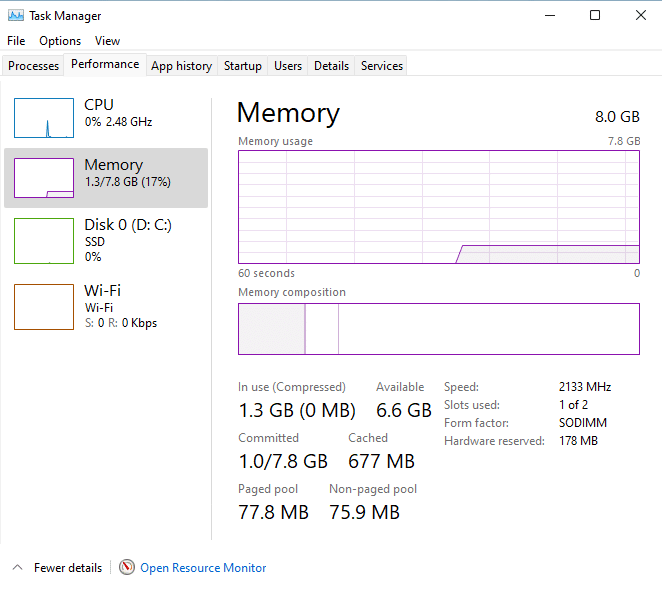
For instance, when no games or demanding apps installed, Windows 11 operating system uses roughly 1.3 GB memory when idle.
For research purposes, if you open one or two browsers with a large number of tabs, 8 GB of RAM can still handle the task efficiently.
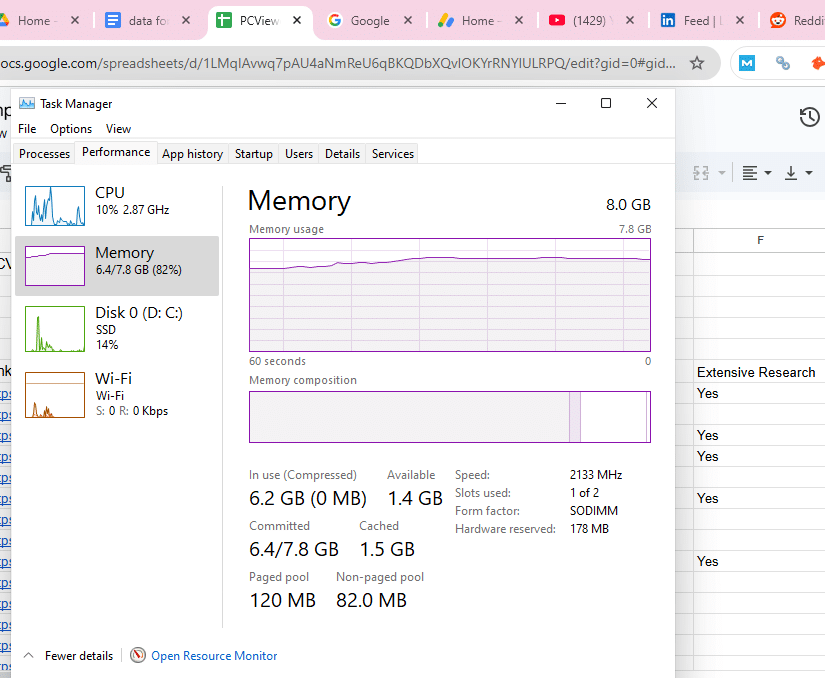
For instance, I ran 15 tabs across two different browsers—Chrome and Brave—and the total RAM usage was about 6.2 GB. This means that even with two browsers and 15 data-intensive tabs such as YouTube, Google Drive, Excel sheets, Google Docs, and a few others, the system still used around 5 GB of RAM for these tasks.
Therefore, 8 GB of RAM is sufficient for researchers and other professionals whose work primarily relies on SaaS-based tools.
8 GB RAM also easily handles such casual work (web, office suites) quite well, assuming background apps are minimal.
Another great advantage of 8GB of RAM is its cost-effectiveness. In comparison to 16 gigs, it is more affordable and capable of delivering adequate performance for daily tasks.
If you’re a casual user or someone like a writer who mainly uses a browser and writing tools, you shouldn’t waste money on 16 GB of RAM, especially as RAM prices are rising due to increased demand from AI. You’ll likely never fully utilize that much memory for such workloads.
Benefits of 16GB of RAM:
If you don’t have a lot of background apps open, 16 GB is sufficient to edit 1080p and even 4K video (with few effects) without experiencing many stutters.
According to Crucial, 16 GB is the recommended amount for intermediate use, which includes running multiple office applications, tabs in the browser, and possibly light editing. And, in the context of gaming, many current AAA titles have 16 GB in their recommended system requirements.
Now, for ultra-smooth gameplay, the general consensus is that sixteen whopping gigabytes of memory outshines a mere eight. This extra oomph enables you to run programs in the background and still enjoy your gaming experience without any hiccups.
According to Steam’s Hardware & Software Survey from early to mid-2024, 41.88% of users reported using 16 GB of system RAM.
If you’re someone who nearly always has multiple tasks open or frequently uses programs requiring a lot of memory, then a laptop packed with 16GB of RAM can really ramp up your productivity. No more annoying lags when there’s tons going on, whether running numerous background processes concurrently or firing up several applications.
