
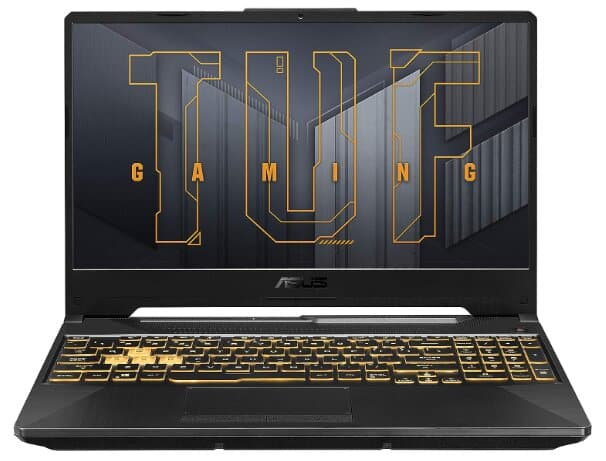
Specifications:
- Screen Size: 15.6 Inches
- Storage: 512 GB
- Processor: Intel Core i5-11400H
- Graphics: NVIDIA GeForce RTX 2050
- RAM Memory: 8 GB
- Operating System: Windows 11 Home
- Number of USB 3.0 Ports: 3
Review:
Finding a gaming laptop that’s both powerful and budget-friendly has become a tricky game—not because choices are scarce, but because the market is overflowing with strong contenders. For most buyers, the sweet spot is a machine that can pull double duty: smooth gameplay for evenings and solid productivity performance for the workday, all without emptying the wallet.
This is where the ASUS TUF Gaming F15 steps in. Known for producing some of the most reliable gaming laptops in the industry, ASUS offers a TUF Gaming lineup designed exactly for this balance of power and value. If you’re aiming for capable gaming performance without breaking the bank, the TUF series is worth a serious look.
The model under review, the ASUS TUF 15 FX506HF-ES51, packs a 6-core Intel Core i5-11400H processor, NVIDIA GeForce RTX 2050 GPU, 8GB of RAM, and 512GB of SSD storage, topped off with a 1920×1080 Full HD display for crisp visuals. Priced at under $800 for the 8GB RAM version, it offers an attractive entry point into gaming laptops—delivering not only solid frame rates in modern games but also enough muscle for video editing and everyday multitasking. The latest 2024 refresh sticks closely to this winning formula, keeping the same specs and competitive pricing.
With that, let’s dive in and see why the TUF Gaming F15 might just be one of the smartest buys in its class.
Design & build quality
The ASUS TUF Gaming F15 maintains the rugged, military-inspired build the TUF series is known for. While the chassis is mostly plastic, it’s reinforced for durability and feels solid in hand. The design features the signature TUF logo, textured surface, and brushed-metal styling, giving it a premium look despite the plastic construction.
The hinge is sturdy, with minimal screen wobble, and the laptop is portable enough for daily commutes, though at 2.3 kg, you’ll feel it in your backpack.
Display and ports:
Even before opening the laptop, LED indicator lights provide at-a-glance information. The 15.6-inch Full HD display with a 144Hz refresh rate delivers smooth, high-resolution visuals.
This 144Hz gaming laptop gets bright too—with a peak brightness of 250 nits, it’s more than enough for indoor use. And it’s anti-glare, so you won’t get annoying reflections from lights or windows around you. That’s great for gaming; you want to stay locked in without anything pulling your attention away.
In terms of ports, you’ll find a variety on the left side, including power in, an Ethernet jack, an HDMI 2.1 port that you can use to connect another monitor, USB ports, and a headset jack. On the right side, there’s a USB port and an exhaust vent. The top of the laptop features LED indicator lights for power, charging, flight mode, and battery.
Speaker & webcam:
The quality of sound from the laptop’s speakers is average and can be used privately but with headphones for a better experience. In addition to that, it has a built-in 720p webcam that produces good video quality and supports AI noise cancellation, which makes voices clearer during online meetings.
Performance and specs:
The ASUS TUF F15 is a newly launched model in 2024. It features advanced hardware and specifications to provide excellent performance, making it highly suitable for both gaming and creative tasks.
The Intel Core i5-11400H is a capable gaming and productivity processor. With 6 cores and 12 threads, it delivers great multitasking and gaming performance. In benchmarks, it achieves 9237 points in Cinebench R23 multi-core, meaning it can handle CPU-heavy games and video editing without bottlenecking the GPU.
In gaming performance, the ASUS TUF Gaming F15 delivers impressive results for its price point. Esports titles run exceptionally well; Valorant easily exceeds 130-140 FPS at the Full HD medium preset, while Counter-Strike 2 stays 40 FPS on High settings; 14–16 FPS at 4K. Fortnite averages 90-95 FPS on high settings with DLSS Quality enabled, and GTA V hits roughly 68 FPS at ultra settings. Demanding AAA games also perform respectably; Cyberpunk 2077 manages about 42 FPS on medium and 29 FPS on High. Even visually rich racing titles like Forza Horizon 5 hover around 53 FPS at high settings.
While the RTX 2050 is considered entry-level in NVIDIA’s RTX lineup, its support for DLSS and ray tracing means you can enjoy modern features and smoother frame rates in demanding titles without significantly compromising visual quality.
Now onto the RAM: this laptop comes with 16GB of DDR4 RAM clocked at 3200MHz (you can upgrade it if you ever need more). 16 GB of memory means it is pretty fast and efficient when running applications or multitasking between different windows on your computer screen at once, but what makes me excited about this feature is its flexibility—there are two memory slots available, allowing for upgrades up to 32 GB of maximum capacity!
As far as storage goes, it comes with a 512GB SSD, which I think should be enough space for most people but if not, then don’t worry because, like the RAM, it can also be upgraded later on!
I must say that this laptop performs really well in terms of performance when it comes to everyday tasks such as watching videos online, browsing through different websites and even attending virtual classes.
In my opinion, the 2050 is actually a decent card considering its price because it works fine when it comes to video editing or gaming, either way around. Nonetheless, this laptop does perform adequately for the price it costs.
Frankly speaking, if you can afford to buy a gaming laptop a little above $1000, then this machine, the MSI Cyborg 15 will make your day. Secondly, if you need a work-gaming combo, then the MSI Thin GF63 Laptop can be an even better choice. Both were recently launched in 2024 with advanced features and can do anything you want to on your machine.
Battery:
Battery life on this laptop isn’t exceptional. It comes with a 48W 3-cell lithium battery, which is typical for gaming laptops.
You can’t charge it using the USB Type-C port; it’s only for display and data transfer. You’ll need to use the regular DC jack for charging.
The laptop supports fast charging with a 150W power adapter included. However, don’t expect long battery life—around 2 to 2.5 hours at most, especially during intensive tasks like gaming.
You’ll need to stay plugged in most of the time. If you want to save battery life, it is recommended to use power efficiency settings in Windows or the Armory Crate software. But even with these measures, don’t expect too much battery life, especially for gaming or video editing. Normal tasks like watching videos or browsing can be manageable on this battery power.
So, who is the Asus Tuf F15 for? This laptop is ideal for anyone who needs a versatile machine that can handle various tasks, such as gaming and video editing. At around $700, it’s a solid choice considering what else is available right now.
What’s good in the ASUS TUF gaming F15:
- Bang for your buck! This laptop can run games really well, video editing software, and everyday tasks without any issue
- The device feels solid and durable
- It has a smooth display, which is perfect for quick games
- RAM and storage can be upgraded at any time
- Games run smoothly at 1080p thanks to the DLSS feature
What’s not so good in the ASUS TUF gaming F15:
- The battery life isn’t great so expect to have to keep it plugged most of the time
- USB-C cord can’t be used to charge the laptop
- Speakers are not very loud or of high quality, so you might want headphones
- The colors on the screen aren’t quite right for photo editing
