
On average, laptops last around 4–5 years. However, many well-maintained laptops, especially premium business laptops and MacBooks, remain useful for 6–8 years or even longer.
According to the well-reputed computer brand HP, the practical lifespan of a computer ranges from 3 to 8 years, depending on usage, maintenance and individual needs.
When we talk about laptop lifespan, there are two things to consider.
First, how long can the laptop’s components, such as its processor, battery, storage and motherboard, continue working?
Second, how long will the laptop remain powerful enough to perform the tasks you bought it for?
For instance, a seven-year-old laptop might still be excellent for browsing, watching movies and working on documents, but the same laptop might no longer be suitable for playing the latest games.
What Is the Average Lifespan of a Laptop?
As we said earlier, most laptops remain useful for around 4–5 years under regular usage.
According to Asurion, a technology repair and protection service provider, most laptops last between 4 and 8 years.
Interestingly, a 2026 consumer reliability survey published by Testachats, which collected 31,054 consumer responses in total, reported an average laptop lifespan of seven years.
However, how long your laptop lasts primarily depends on its specifications, build quality, usage and maintenance.
Here are the estimated lifespans for different laptop categories based on Asurion's guidance.
| Laptop category | Expected lifespan |
|---|---|
| Budget laptops | 3–5 years |
| Mid-range laptops | 4–6 years |
| Premium ultrabooks | 5–8 years |
| Business laptops | 5–8 years |
| Gaming laptops | 4–6 years |
| Chromebooks | 4–6 years |
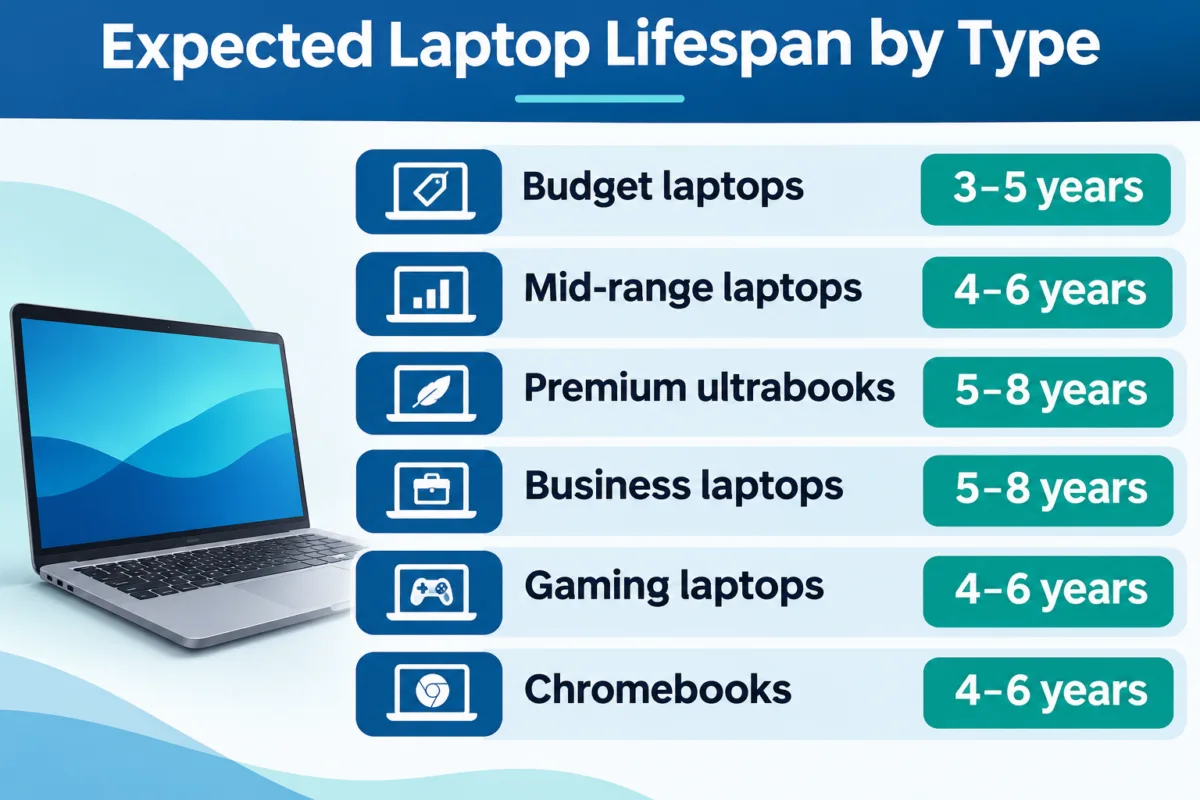
For instance, even some of our recommended laptops under $500 can remain useful for five years or longer if you primarily use them for everyday tasks.
Average Laptop Lifespan by Brand
Laptop manufacturers offer different product lines for different types of users.
For instance, HP manufactures affordable consumer laptops, premium laptops, business laptops and mobile workstations. Their build quality, components and repairability differ significantly.
However, consumer surveys and real-world repair records provide useful insights into the longevity of different laptop brands.
According to a 2026 Consumer Reports reliability study, 16% of laptops owned by surveyed members developed problems or stopped functioning properly within three years.
Meanwhile, an analysis of 10,181 community repair records, updated in November 2026, provides the following figures.
| Laptop brand | Typical age at repair | Successful repairs |
|---|---|---|
| HP | 7 years | 64.4% |
| Dell | 7 years | 55.9% |
| Apple | 7 years | 54.5% |
| Acer | 6 years | 55.5% |
| ASUS | 6 years | 56.8% |
| Lenovo | 5 years | 60.9% |
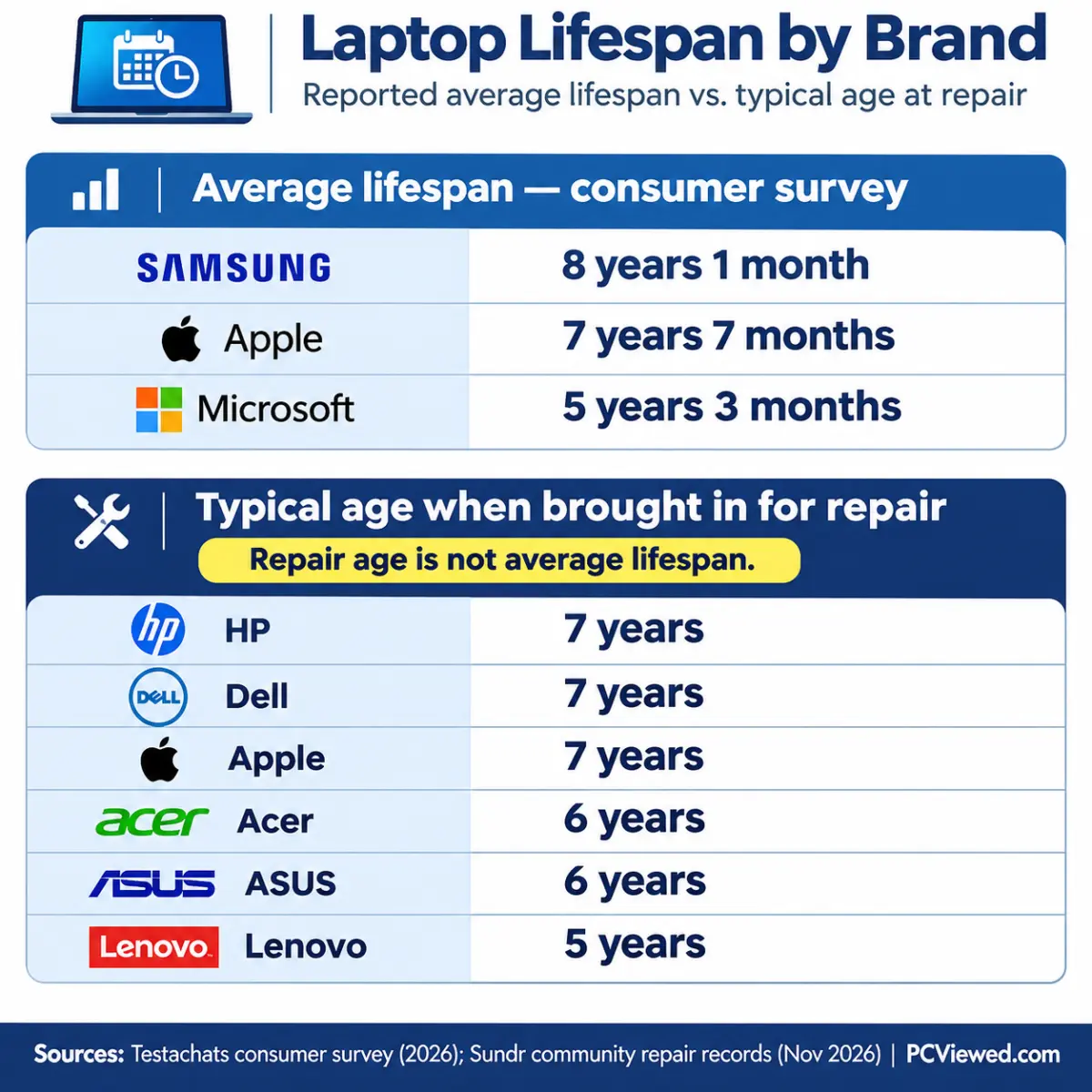
These figures represent laptops brought in for repair, not the average lifespan of every laptop sold by each brand. They show that many laptops remain repairable even after five to seven years.
How Long Do HP Laptops Last?
According to HP's own guidance, a well-maintained laptop can generally be expected to last between three and five years.
However, an analysis of 2,504 HP laptop repair records found that these machines were typically seven years old when brought in for repair.
If longevity is your priority, HP ProBook, EliteBook and ZBook models are worth considering because these product lines are designed for business and professional workloads, with durability and serviceability among their important features.
How Long Do HP Student Laptops Last?
HP recommends planning for a student laptop to last approximately 3 to 5 years, enough to complete a typical four-year college degree.
For younger students, HP's Fortis education laptops are designed for more demanding classroom environments.
According to HP, these devices are designed to withstand a 76cm drop onto concrete during durability testing.
How Long Do Dell Laptops Last?
Based on general laptop lifespan estimates, you can reasonably expect a Dell laptop to remain useful for around 4–6 years.
Interestingly, an analysis of 1,007 Dell laptop repair records found that the typical age of these laptops at repair was seven years.
If you want to use a Dell laptop for several years, its business-oriented Latitude and Dell Pro product lines are worth considering because serviceability, business support and durability are important considerations in these categories.
How Long Do Lenovo Laptops Last?
According to Lenovo, most Lenovo laptops last around 3–5 years with proper care.
However, Lenovo estimates that its ThinkPad laptops can last around 5–7 years under regular usage.
If longevity is your priority, ThinkPads are worth considering because many models offer durable construction, spill-resistant keyboards and replaceable components.
How Long Do MacBooks Last?
MacBooks often remain useful for 6–8 years or longer because of their performance, build quality and software support.
The 2026 Testachats consumer reliability survey reported an average lifespan of seven years and seven months for Apple laptops.
One interesting thing about Apple laptops is their extended repair support.
According to Apple's official service policy, Mac laptops may qualify for battery replacement services for up to 10 years after Apple last distributes the model for sale, subject to parts availability.
However, since the RAM and storage in modern MacBooks generally cannot be upgraded, choosing the right specifications when purchasing one is particularly important.
How Long Do Acer Laptops Last?
According to Acer's computer lifespan guide, laptops generally last between three and five years.
An analysis of 1,327 Acer laptop repair records found that these laptops were typically six years old when brought in for repair.
Furthermore, the Testachats consumer survey identified laptop hinges as an area where Acer owners reported more problems than average.
If you frequently carry your laptop or open and close its lid throughout the day, hinge and chassis quality are particularly important considerations when choosing an Acer laptop.
How Long Do ASUS Laptops Last?
According to ASUS, the average laptop lifespan is around 3–5 years.
However, an analysis of 1,094 ASUS laptop repair records found that the machines were typically six years old when brought in for repair.
So, you can reasonably expect five years of regular use, with the possibility of considerably longer use through maintenance and repairs.
How Long Do Samsung and Microsoft Laptops Last?
The 2026 Testachats consumer survey reported the following average lifespans:
- Samsung laptops: 8 years and 1 month.
- Microsoft laptops: 5 years and 3 months.
Samsung recorded the longest average lifespan among the brands discussed in the survey, followed by Apple at seven years and seven months.
Laptop Lifespan by Usage
What you do with your laptop plays a significant role in determining how long it remains useful.
A laptop that is no longer powerful enough for modern gaming might still be extremely good for office work, studying or everyday use.
Everyday and home-use laptops
Consumer laptops used for browsing, watching movies, checking emails and working on documents can remain useful for five years or longer.
These tasks generally have less demanding hardware requirements than gaming, engineering or professional video editing.
If you buy a laptop with a capable processor, 16GB RAM and SSD storage, you can comfortably use it for many everyday tasks for years.
Student laptops
Student laptops generally remain useful for around 3–5 years or longer.
However, the requirements of a student studying engineering, architecture or computer science can differ significantly from those of a student who primarily uses a laptop for assignments, research and online classes.
Buying a laptop that meets the requirements of your future coursework can help you avoid replacing it before completing your degree.
Business laptops
According to Asurion, business laptops generally last between five and eight years.
Business laptops are often designed with durable components, better thermal management, serviceability and extended warranty options.
These features make them particularly useful for people who use computers for several hours every day.
However, business users may need to upgrade earlier if their applications become more demanding or maintaining older machines becomes expensive.
Gaming laptops
Most gaming laptops remain capable of playing new games at good settings for around 3–5 years.
However, they can continue running older and less demanding games for much longer.
One of the major reasons gamers upgrade their laptops is that newer games demand more powerful processors, graphics cards and additional memory.
Laptops for professional work
When buying a laptop for professional work such as video editing, 3D rendering, engineering or AI, planning for three to five years of productive use is a reasonable starting point.
A powerful mobile workstation may remain useful much longer if your workload and software requirements remain relatively consistent.
Do Expensive Laptops Last Longer?
There is some truth to the idea that spending more money on a laptop can help you use it longer.
More expensive laptops can offer powerful processors, additional memory, better cooling systems and stronger construction.
As a practical buying estimate, here is how laptop prices can relate to their useful lifespan.
| Laptop price | Estimated useful lifespan |
|---|---|
| Under $500 | 3–5 years |
| $500–$700 | 3–6 years |
| $700–$1,000 | 4–7 years |
| $1,000–$1,500 | 5–8 years |
| Above $1,500 | 5–10 years or longer |
These are approximate buying guidelines based on laptop performance and quality categories, rather than measured lifespan averages for each price range.
But once you reach a certain price point, spending more does not necessarily increase the laptop's lifespan.
For instance, if you primarily work with documents, spreadsheets and web-based applications, a $2,000 gaming laptop may not remain useful significantly longer than a well-configured $800 business laptop.
What matters is what you get for your money.
Our guide on how much you should spend on a laptop explains suitable budgets for different workloads.
What Factors Affect Laptop Lifespan?
According to the Testachats consumer survey, the most frequently reported laptop component problems were:
| Component | Respondents reporting problems |
|---|---|
| Battery | 16% |
| HDD or SSD | 6% |
| Keyboard | 6% |
| Power cable | 5% |
| Wi-Fi | 4% |
Besides physical component failures, insufficient computing power and outdated software can also reduce your laptop's useful lifespan.
Processor
Your laptop's processor determines how efficiently it handles applications and computing tasks.
As applications become more demanding, older processors may struggle to provide the same performance.
Since processors in most modern laptops cannot be upgraded, choosing the right processor when buying a laptop is particularly important.
RAM
Insufficient RAM is one reason a laptop may start struggling with newer applications or multitasking.
For most people buying a laptop for studying, office work and everyday multitasking, 16GB RAM is a practical choice.
For demanding professional applications, 32GB or more may help the laptop remain useful for longer.
If your laptop has soldered RAM, choosing enough memory when purchasing it is particularly important because you cannot upgrade that memory later.
Storage
SSDs can remain functional for 5–10 years under regular use, while HDDs experience mechanical wear over time.
However, storage performance can affect your laptop's usefulness long before the drive physically fails.
Replacing an old HDD with an SSD can significantly improve boot times, application loading and overall responsiveness.
Read our detailed SSD vs HDD comparison to understand the differences in lifespan and performance.
Graphics card
The graphics card is particularly important for gamers, video editors, engineers and 3D designers.
A laptop's GPU may continue functioning for many years, but newer software and games may require more graphics processing power or video memory.
Since dedicated graphics cards cannot generally be upgraded in laptops, choosing a suitable GPU initially can extend their useful lifespan.
Battery
According to HP's battery guide, laptop batteries typically experience noticeable capacity loss after two to four years, or approximately 300–1,000 charge cycles.
For instance, many modern MacBook batteries have a rated cycle limit of 1,000 cycles.
However, a worn-out battery does not mean the entire laptop needs replacing.
Corey Donovan, president of Alta Technologies, identifies the battery as one of the first components that commonly deteriorate in an interview with Business Insider.
Replacing the battery can give an otherwise capable laptop several additional years of usefulness.
Build quality
The quality of the laptop's hinges, keyboard, chassis, cooling system and internal components affects how well it withstands years of regular use.
This is particularly important for students, business owners and professionals who frequently carry their laptops around.
When buying a laptop for long-term use, look for strong hinges, durable construction, replaceable batteries and readily available replacement parts.
Software support
A laptop may physically work perfectly but become less useful when its operating system and applications no longer receive updates.
For instance, Google provides 10 years of automatic updates for Chromebook platforms, starting from the platform's release.
If you buy an older Chromebook, some of those ten years may already have passed.
Continued software and security support is particularly important when you use a laptop for business, banking or other sensitive activities.
Can a Laptop Last 10 or 20 Years?
Yes, a laptop can last 10 years.
Many older laptops continue to perform basic tasks after a decade, especially when their RAM, storage or batteries have been upgraded.
It is also possible for a laptop to physically work after 20 years. However, its usefulness for modern computing tasks becomes increasingly limited due to outdated hardware, unavailable replacement parts and software compatibility issues.
For instance, an old laptop may still be useful for writing documents, playing older games or running a lightweight operating system even when it cannot run the latest version of Windows.
The question is not simply whether your laptop turns on after ten years. It is whether it can still perform the tasks you need it for.
Do Laptops Last Longer Than Desktops?
We can conclude that laptops typically last around 3 to 6 years, while desktop computers typically last around 5–8 years.
Desktop computers generally offer a longer useful lifespan because they are easier to repair, cool and upgrade.
For example, if a desktop's processor, graphics card or power supply becomes outdated or fails, you can often replace that particular component without replacing the entire computer.
Laptops have more compact designs, and many of their components are integrated into the motherboard.
They are also frequently exposed to movement, accidental drops and battery wear.
If long-term upgradeability is your primary concern, a desktop computer may be a better investment.
How to Check Your Laptop's Remaining Useful Life
Rather than judging your laptop entirely by its age, check whether it still meets your requirements.
| What to check | How to check |
|---|---|
| Processor performance | Check CPU utilization while running your usual applications |
| RAM | Check memory utilization in Task Manager |
| Battery health | Generate a battery health report |
| Storage health | Run the manufacturer's storage diagnostic tool |
| Operating temperature | Check for overheating, thermal throttling and unexpected shutdowns |
| Upgrade options | Check the manufacturer's service manual |
| Software compatibility | Compare your specifications with application requirements |
| Repair costs | Compare repair estimates with the cost of a suitable replacement |
Check your laptop's battery health
On Windows, open Command Prompt and run:
powercfg /batteryreport
The generated report shows the battery's original design capacity and current full-charge capacity.
To calculate its remaining battery capacity as a percentage, divide the full-charge capacity by the design capacity and multiply it by 100.
For instance, if your laptop's original battery capacity was 50,000mWh and its current capacity is 35,000mWh, it retains 70% of its original capacity.
On a MacBook, open System Information and select Power to check its battery cycle count and condition.
Apple provides a model-specific battery cycle reference that helps you understand how much of its rated cycle life has been used.
When Should You Replace Your Laptop?
You don't necessarily need to replace a laptop because it is four or five years old.
If it performs your tasks comfortably and has no major hardware issues, you can continue using it.
The following table can help you decide whether to repair, upgrade or replace your laptop.
| Problem | Recommended action |
|---|---|
| Battery drains quickly | Replace the battery |
| Insufficient RAM | Upgrade RAM if possible |
| Slow mechanical hard drive | Upgrade to an SSD |
| Insufficient storage | Upgrade storage |
| Dust buildup and overheating | Service the cooling system |
| Broken keyboard or hinge | Repair or replace the affected component |
| Processor or GPU cannot handle required applications | Consider replacing the laptop |
| No supported operating system for your requirements | Consider replacement |
| Multiple expensive component failures | Compare repair costs with replacement |
When deciding whether a repair is financially worthwhile, also consider how long you expect to continue using the laptop afterward.
For example, spending $100 to repair a laptop that you can comfortably use for another two years works out to $50 per year.
By comparison, spending $800 on a new laptop that you expect to use for five years works out to $160 per year.
If your existing laptop still meets your requirements, repairing it may be the more economical option.
How to Make Your Laptop Last Longer
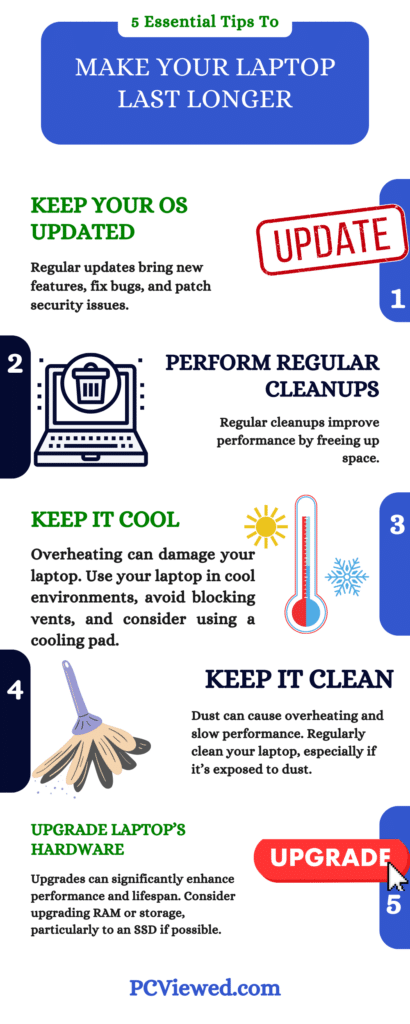
With regular maintenance and timely upgrades, you can significantly extend your laptop's useful life.
Keep the operating system updated
Operating system updates fix bugs, improve compatibility and address security vulnerabilities.
Keep your operating system, drivers and essential applications updated.
Clean your laptop regularly
Dust can accumulate inside a laptop, especially around its fans and air vents.
I experienced this issue with the laptop I use for my home office. After noticing that it was slowing down, I checked it and found dust inside the system.
Keeping your laptop clean helps maintain airflow and prevents unnecessary overheating.
Keep your laptop cool
Avoid placing your laptop on beds, blankets and other soft surfaces that can block its air vents.
If your laptop frequently overheats, cleaning the fans and servicing the cooling system can help.
A cooling pad can also improve airflow on suitable models.
Take care of the battery
Avoid exposing your laptop to excessive heat or frequently allowing its battery to discharge completely.
According to Microsoft's battery care guidance, keeping a lithium-ion battery between approximately 20% and 80% when practical can help reduce battery wear.
If you primarily use your laptop while it is plugged in, enable its battery conservation or charging-limit feature if available.
Protect it from physical damage
Use a protective laptop bag when traveling, avoid placing heavy objects on the laptop and keep liquids away from it.
If you accidentally spill liquid on your laptop, shut it down, disconnect the charger and avoid turning it back on until it has been properly inspected.
Upgrade RAM and storage
If your laptop has become slow, you might not need a new computer.
I upgraded the RAM in my HP laptop and continued using it for approximately three more years.
Similarly, replacing a mechanical hard drive with an SSD can significantly improve the performance of an older laptop.
Our laptop upgrade guide explains which components you can upgrade.
Fix problems before they become serious
Do not ignore unusual fan noises, frequent crashes, overheating or sudden shutdowns.
Identifying and fixing these problems early can prevent further damage and help your laptop remain useful for longer.
