
Finding a good, cheap gaming laptop without losing important features is a hassle. Let’s be honest, if you’re spending less than $1,000, most laptops can’t handle graphics-heavy games like Cyberpunk 2077 and Fortnite.
But the MSI Cyborg 15 is different.
With a powerful 13th Gen Intel Core i7-12650H processor and RTX 40-series graphics, the MSI Cyborg 15 is a good laptop for gaming. I was impressed by its gaming performance. It won’t give you the super high frame rates of very expensive gaming laptops, but it has enough power for most gamers.
Fancy things are missing on the Cyborg 15, as in other costly gaming laptops, but if your aim is to get a simple gaming machine for big-time games, this is the right choice, among others.
Specs of MSI Cyborg 15:
- Screen Size: 15.6 Inches FHD IPS
- Resolution: 1920 x 1080 pixels
- RAM: 32 GB DDR5
- Hard Drive: 1 TB SSD
- Refresh Rate: 144Hz
- Processor: Intel Core i7-12650H
- Processor Speed: 4.7 GHz
- Graphics Coprocessor: A Dedicated NVIDIA GeForce RTX 4060
- Special Features: Backlit Keyboard
- Number of USB 3.0 Ports:
- 2 x USB-A 3.2 Gen1
- 1 x USB-C 3.2 Gen1 w/DP1.4
- 1 x HDMI
- 1 x Audio Combo (1/8″)
- 1 x RJ-45
- Operating System: Windows 11 Home
- Laptop Weight: 4.37 pounds (or 2 Kg)
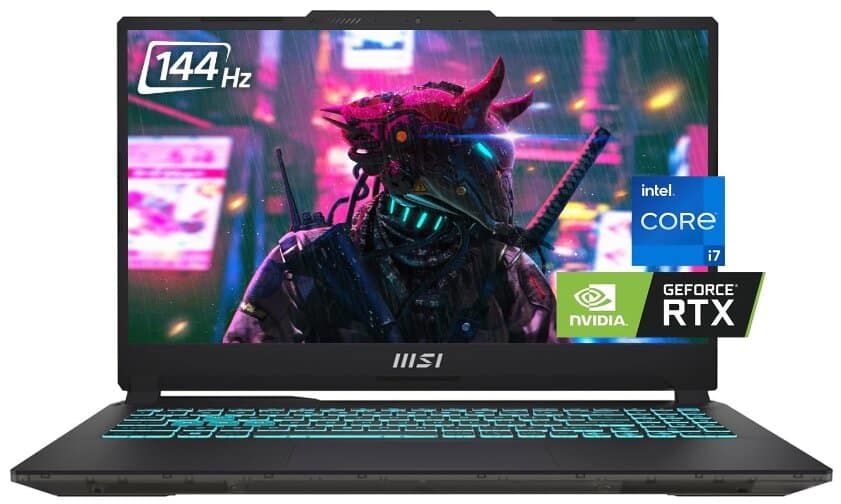
MSI Cyborg 15: Pros and Cons
Pros
- ✅ RTX 4060 is available at an affordable price
- ✅ Good performance
- ✅ Comfortable keyboard
- ✅ Large touchpad
- ✅ Cool design
Cons
- ❌ Fixed blue backlighting
- ❌ Short battery life
- ❌ Average webcam
Design:
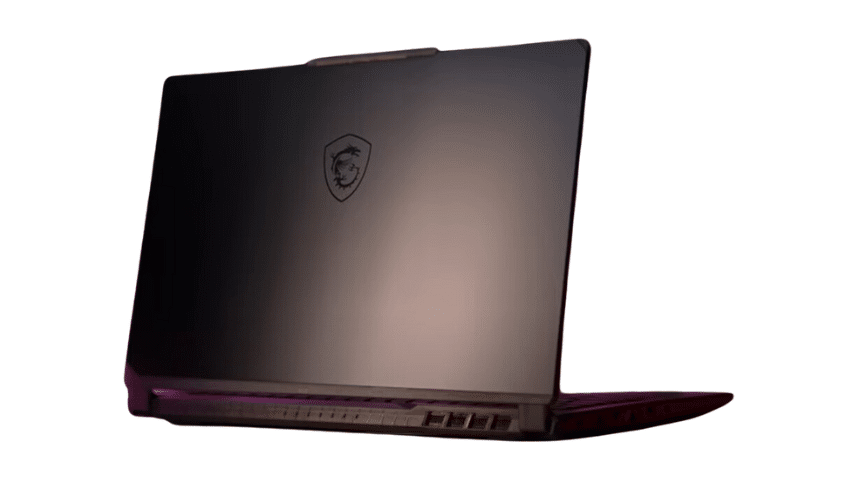
First, let’s talk about the design of the MSI Cyborg 15.
Rather than glossy black plastic, the Cyborg 15 sports a futuristic translucent chassis that reveals some internal components—not just for show, but for a sleek retro‑cyberpunk vibe.
You might think the translucent design is just a gimmick, but I appreciate it. It also helps to distract from the fact that most of the MSI Cyborg 15 is made of plastic.
The Cyborg 15 stands out without being too flashy. If you look closely, you’ll notice its unique design, but at a quick glance, it looks like any other gaming laptop.
I typically care less about how attractive a laptop appears than I do about its performance and display quality; however, in this case, the design is one of the best things about the Cyborg 15. It’s just sick!
The laptop offers a good range of ports. On the left side, there’s a Kensington lock, a USB 3.2 Gen1 Type-A port, and a 3.5mm headphone jack.
On the right side, there’s the DC charging port, an RJ45 port, a full-sized HDMI 2.1 port that you can use to connect another monitor, a USB Type-C 3.2 Gen1 port with DisplayPort support, and another USB 3.2 Gen1 Type-A port. It would have been nice to see a ThunderBolt 4 port, but that’s one of the compromises to keep the cost down.
Weighing 4.37 lbs (or, 2kg), the Cyborg 15 is quite portable. The build quality is good for the price. The chassis is mostly plastic, but it feels sturdy with minimal flex under the keyboard. The display wobbles a bit, but it doesn’t affect the overall design.
Display:
Some of you might not be impressed by the Cyborg 15’s 1080p resolution. I understand this because, as a person who enjoys playing games with resolutions of 2K and 4K, nothing trumps the experience. However, I believe that having ultra-high-resolution screens on laptops is not always essential. As far as the Cyborg 15 is concerned, a resolution of 1080p should be just fine for a budget gaming laptop.
The 144Hz FHD (1920 x 1080) IPS panel on the Cyborg 15’s display is decent but not “great.”
It peaks at about 238 nits brightness, which isn’t very high, so outdoor or brightly lit room use can feel a bit dim.
Color coverage is limited—only 70.4% of sRGB and 49.9% of DCI‑P3, so colors feel duller and less vibrant than on high-end displays.
That means the display won’t dazzle with vivid hues, but the 144 Hz refresh rate still delivers smooth frame delivery for ultra-fast games, and it’s flicker-free for comfortable long-term use.
Although not all games will have the ability to run at the refresh rate of 144 Hz, there are instances where it comes in handy.
Games like Doom Eternal and Cyberpunk 2077, with their well-defined environments, looked okay on Cyborg’s screen. The smoothness added by its refresh rate of 144 Hz also contributed to an immersive experience. Immersion is big for me and the display on Cyborg keeps me into it; that’s what makes it my favorite.
Keyboard:
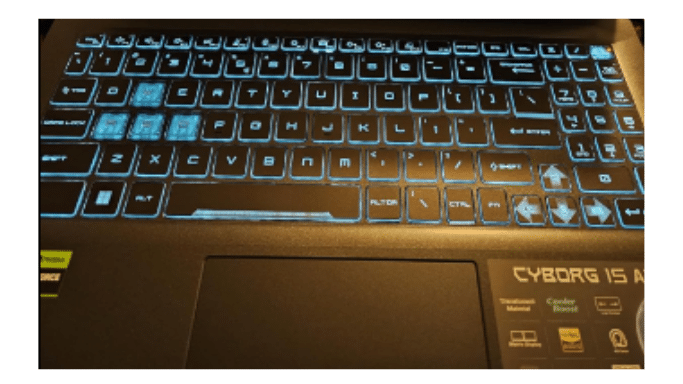
As you can see in the picture of MSI Cyborg 15 keyboard (where the backlighting is on), despite its affordable price, this laptop has a great keyboard. Unlike MSI’s more expensive gaming laptops, the Cyborg 15’s keyboard Isn’t made with SteelSeries. But it still shares a lot of features with its pricier siblings.
The keys have good travel, and the keyboard includes a full-sized layout with a NumPad. Even though it’s not cramped, the function key is oddly placed next to the arrow keys. But each arrow key also works as a hotkey when you press the Fn key. You can use them to control media, change fan settings, or turn the display on and off.
Now, you might be wondering about RGB lighting. Unfortunately, there isn’t any. Instead, there’s a single blue LED under the keyboard. But you can adjust the brightness of this backlight. Personally, I don’t mind this, considering the laptop’s price. I prefer a bright single-color LED over dim RGB lights any day.
Also, the touchpad is a good feature. It’s big and covers a lot of space on the laptop. It’s easy to move your finger on it, with just the right amount of smoothness and resistance. This makes it easy to control the cursor on the screen.
Performance:
The MSI Cyborg 15’s speed and performance are the things that stand out for this laptop. Pairing the Intel Core i7‑12/13th Gen H‑series processor with an RTX 4060 GPU, the Cyborg 15 delivers solid frame rates at 1080p for most modern titles, even though the GPU is capped at just 45 W TGP, lowering its raw power compared to other RTX 4060 laptops.
Surely, the most recent games may not hit their highest settings, but it runs fine when playing the top PC games at 1080p resolution with medium or high settings.
During testing, Doom Eternal ran at 135 to 144 frames per second on both medium and high settings. The fast 144Hz refresh rate made it easy to move around the game’s environments and play the game smoothly without any lag.
Similarly, in Cyberpunk 2077 (Ultra settings with DLSS enabled), the laptop typically holds around 60–70 FPS, falling into the upper 40s when the action intensifies—smooth enough for immersive play.
Shooter titles like Borderlands 3, Far Cry 6, and Assassin’s Creed Valhalla hover between 53 and 66 FPS, making them comfortably playable with good detail settings.
Fortnite could be played on this laptop too, although some changes might need to be made. By putting Fortnite in performance mode and setting everything to low, we were able to get over 200 fps.
Battery and charging:
The MSI Cyborg 15 has a 3-cell 53.5 Whr battery, which is pretty good for gaming. In my tests, I got around four hours of battery life with moderate use and 3 hours of gaming. So, you can expect the MSI Cyborg 15 to last 3 to 4 hours depending on your use.
It’s good battery life in gaming laptops.
This is mainly due to Nvidia’s Optimus technology, which helps save battery power when you’re not running heavy-duty applications.
For charging, there’s a 120W charger included, and it works as you’d expect.
Webcam and speakers:
The webcam on the Cyborg 15 shows it’s a budget laptop. It’s a bit grainy and struggles to show a clear picture, even in good light.
MSI puts two 2-watt speakers in the Cyborg 15, which is the basic setup for any laptop. As expected, the sound is a bit tinny and lacks bass. So, it’s a good idea to have your headphones nearby.
Responsiveness and Storage:
With 32 GB of DDR5 RAM, the system boots Windows in about 2 seconds, and launching games or applications happens almost instantly with no waiting around. Multitasking is seamless, even with heavy browser usage and game streaming running in the background.
As the MSI Cyborg 15 is upgradable, if you are not satisfied with 32 GB DDR5 RAM you can upgrade it to 64 GB. Similarly, you can upgrade the storage. The option is available on Amazon when purchasing the machine.
Moreover, MSI put a 1 TB PCIe 4 SSD (M.2-2280) from Samsung in the Cyborg. It’s pretty good for transferring files, but it’s not one of the best SSDs out there.
You can only add more storage to the MSI Cyborg 15 using the available multiple USB ports. Unfortunately, there is no slot available to add an additional internal SSD. So, if you want to upgrade the storage, you will have to remove the previous one and replace it with a larger capacity drive.
That said, if you think you will require more space in the future, you should invest a little more to buy a 2TB SSD instead.
Final thoughts
If you are a practical gamer who just needs average frame rates and a 1080p display along with a comfortable keyboard, then this is the perfect choice for an MSI cyborg. And it comes at quite an affordable price.
The MSI Cyborg 15 came out in Aug 2023 and it’s one of the best picks in 2024 as well.
