
If you understand how a computer works, you will instantly realize the importance of RAM. As you know, the CPU is the key component that processes all data. However, it doesn’t take data directly from storage. Instead, your PC first loads the required data into RAM, which is 3000+ times faster than a hard drive.
Think of storage as a library and RAM as your work desk. The larger the desk, the more books or files you can keep open at once. This makes you faster and more efficient, depending on your workload.
Key Takeaways:
- Role of RAM: It is crucial for storing data that your computer’s CPU needs quick access to. It differs from storage (like SSDs or HDDs) which retains data even when the PC is off.
- RAM Specifications:
- Capacity: Aim for at least 8GB for general use, 16GB for gaming and heavier tasks, and 32GB or more for professional use like video editing or CAD.
- Speed: Higher frequencies (measured in MHz) generally mean faster RAM, but compatibility with your CPU and motherboard is crucial.
- DDR Type: Choose DDR4 for affordability and compatibility with older systems, or DDR5 for future-proofing and higher performance (if supported by your CPU and motherboard).
- Choosing RAM: Consider your budget, system requirements, and future needs when selecting RAM. Stick to reputable brands like Crucial or Samsung for reliability.
So, if you’re looking to buy RAM for a new computer or upgrade your current laptop and are confused about how much RAM you should buy—whether it’s 8GB, 16GB, 32GB, or more—or researching how important clock speed and memory timings are, we have discussed everything to help you make a wise decision.
Let’s get started.
What is RAM (also known as Memory)?
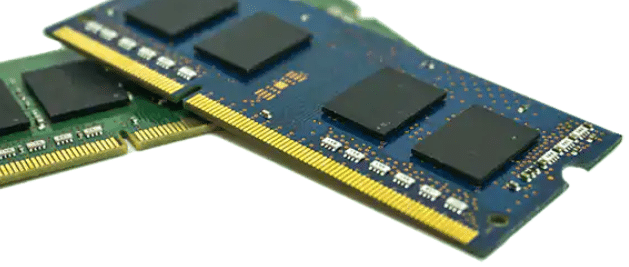
RAM, or Random Access Memory is the primary memory a system, it’s short term and volatile memory. It means, when the PC is switched off, unlike secondary memory (storage) it will erase all the data aailable on it.
It is a type of memory in your computer that only holds data while your PC is on. Its main purpose is to give your processor (CPU) quick access to the information it needs.
There is a big difference between memory (RAM) and storage.
RAM stores data that your programs and operating system are currently using, so the CPU can get to it faster. This is not the same case with storage devices like SSDs and HDDs, which keep data even when the PC is off.
What’s important to note is that the higher the capacity, the more data it can store and the better it can provide access to the CPU, resulting in improved performance.
That’s why higher RAM capacities are required to running demanding software, such as applications used in data science, engineering simulations, and graphic design, or to handle a multitude of programs simultaneously during multitasking.
Decoding RAM specifications:
When picking RAM for your PC, there are a few key things you need to know: capacity, speed, and type.
Capacity:
Now, here’s what most people know about memory: more RAM is better, and less RAM is worse. And yes, that’s true to some extent, but it’s not the whole story.
Let me give you an example. Many people assume that doubling your RAM will double your performance. So if you move from 8 gigabytes to 16, your computer should be twice as fast, right? Well, not exactly. Real-world benchmarks tend to show significant but modest gains and depend heavily on your specific workloads.
For instance, Cyberpunk 2077’s official system requirements list 12 GB of RAM as the minimum and 16 GB as recommended for a smooth experience. It means, even if you have 32GB RAM on your PC, it won’t affect your gaming experience as it will only use around 12 GB of the RAM.
Speed:
Understanding RAM speed can be a bit confusing. Two main things make RAM fast: frequency and timing.
The speed of the RAM is commonly referred to as frequency. You might see it listed as DDR4-3200 or DDR4-2666 MHz. These numbers show how many times per second the RAM can read or write data. For example, DDR4-3200 means the RAM can do 3.2 billion cycles per second.
Higher frequencies are usually better, but not all CPUs and motherboards support all frequencies. You might need to check if they match. Also, higher-frequency memory will be more expensive.
Timing, also known as CAS latency, measures the delay between when the CPU sends a command to the RAM and when the RAM executes it. You might see numbers like 18-22-22-42.
Lower numbers are generally better. Timing is important, but modern systems can handle most of it automatically, so differences in timing might not make a big impact on your experience.
DDR:
DDR means Double Data Rate, and the number that follows it, such as DDR3, DDR4, or DDR5, shows its generation. This is a key RAM specification because using the wrong DDR type won’t work on your PC.
Each processor and motherboard supports only one or two DDR generations. Some CPUs, like many of Intel’s, support both DDR4 and DDR5. However, motherboards usually support just one type.
So, when building your PC, you must choose which DDR generation to use and stick with it until you upgrade your system.
The difference between DDR4 and DDR5 is significant. DDR4 is cheaper, works with older hardware, and has lower latency. DDR5 is much faster, slightly more expensive, and only works with the latest processors.
DDR4 vs. DDR5
Choosing between DDR4 and DDR5 memory can be perplexing because it’s not just about the type of RAM you prefer. Your decision will largely depend on the processor and motherboard you select.
When you pick a CPU and motherboard, you’re typically limited to a specific type of RAM.
Some Intel CPUs, like the Alder Lake and Raptor Lake series, support both DDR4 and DDR5. But AMD CPUs only support DDR4 or DDR5, not both at the same time. Your motherboard will ultimately determine which RAM you can use.
DDR4 is still a good option for budget-friendly builds. However, if you’re using an Intel CPU that supports both types, DDR5 is a better choice for future-proofing. DDR5 will continue to improve and become cheaper over time, whereas DDR4 has reached its peak and won’t get any better.
Simply put, choose based on your budget. If you can afford it, DDR5 is the better option for long-term use, despite being more expensive.
How much RAM do you need?
Before you buy a new laptop or upgrade your memory, ask yourself: “How much RAM do I really need?” There are minimum requirements for your OS, but other users will require more RAM.
Basically, entry-level tablets, laptops, desktops, and smartphones have RAM of around4GB only. Chromebooks and lightweight devices used mainly for web browsing or basic office tasks are the ones that fit this amount of RAM. For any other purpose, you have to increase it.
Typically, 8 GB is a good baseline for most PCs. This is enough for some light gaming; remote work and your favorite TV series can be easily watched on such a system as well. However, gamers, video editors, or 3D designers will want more than that.
1GB, 2GB, and 4GB RAM
Laptops, desktops, and Chromebooks that are old usually have less than 4 GB of RAM. Nevertheless, having 4GB or less is often not enough for a good experience. Even modern operating system can consume up to 4GB f your RAM when idle.
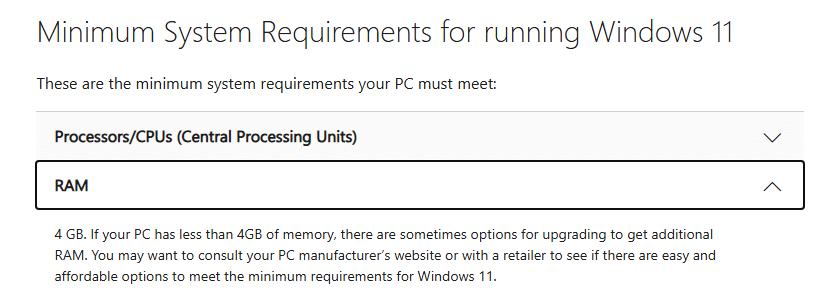
Although 4GB may suffice on Chromebooks.
While this meets the basic requirements, it’s not ideal.
But in reality, just having a minimum can slow things down. For these operating systems to run smoothly, more RAM would be advisable.
8GB RAM
A decade ago, this was standard. Most entry-level laptops, desktops, and Chromebooks shipped with 2 to 4 gigabytes of RAM. And back then, it worked because the operating systems and apps of the time were far less demanding.
But today? Having less than 8GB is often not enough for a good experience. Even opening a few browser tabs or running background updates can push those systems to their limits.
Microsoft themselves recommend at least 4GB for Windows 11. But here’s the important nuance: ‘recommended’ doesn’t always mean ‘comfortable.’
Yes, you can boot the system, and yes, you can open a program or two. But try multitasking, say, streaming a video while editing a document and you’ll quickly hit a wall. Everything is either being loaded on the RAM or it will slow down your PC to collect data again and again form your storage (that’s big like a library)!
Imagine, visiting your library again and again to collect some books.
Thus, more RAM provides a smoother and more future-proof experience.
We tested 8 GB of RAM for casual users, researchers, students, and professionals whose work often relies on SaaS products.
During testing, we opened 15 tabs across two different browsers and attended a video call, and the system used all of 8 GB of RAM. This represents the highest level of performance you can realistically expect from 8 GB of RAM.
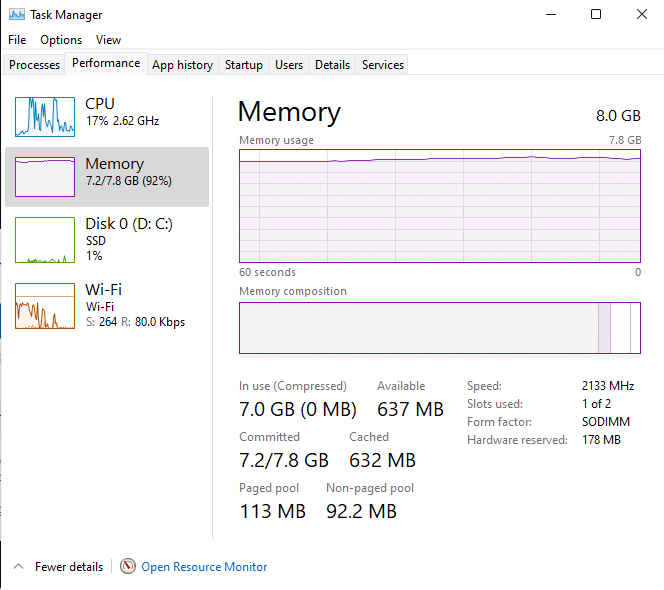
This test can also make you realize whether it’s suitable for you or not. If you workload is more than this, then you should go for 16 GB of RAM to maximize the productivity.
16GB RAM
16GB is the ideal amount of space. It provides ample headroom for contemporary games while still providing enough space for all of your daily tasks, including writing, streaming, browsing, and spreadsheets.
Your system won’t even strain if you have dozens of tabs open, music playing in the background, and a game running.
If you dabble in creative work, say you’re editing photos in Photoshop or putting together videos in Premiere, 16GB is usually more than enough to get the job done.
But if you’re a professional who’s editing 4K video, working with massive design projects, or rendering 3D models, you’re going to want more.
For gamers, 16GB has become the minimum. And not just to run the latest titles, but to run them smoothly. It keeps background apps from interfering, and it keeps frame rates steady, and in competitive games where every second counts, that makes all the difference.
So whether you’re a casual user, a gamer, or a creator, 16GB is the balance point. It’s not overkill, and it’s not too little. It’s just right.
32GB RAM:
Now, let’s talk about going beyond the basics—32 gigabytes of RAM.
For most people, this is more memory than they’ll ever need in the next few years. But there are certain situations where it really makes sense.
If you’re someone who streams while gaming, edits a lot of photos and videos, or spends time transcoding video, it means, you load a lot of data simultaneously, that extra memory gives you the headroom you need.
Think about editing 4K video. When you’re working with huge files in software like Premiere Pro, 16GB can start to feel cramped really quickly.
With 32GB, you can render, cut, and layer without your system slowing down.
The same applies if you’re recording and editing audio or if you’re working in Photoshop with dozens of high-resolution images open at once. It’s not just about speed; it’s about keeping the workflow smooth.
And for gamers, 32GB is what I’d call the “future-proof” option. Today, most games don’t fully use it but tomorrow, they might. If you’re a high-end gamer, or you simply want to make sure your PC can handle whatever comes next, 32GB ensures you’re covered.
Of course, it does come at a higher cost, so the smart move is to check whether the games or apps you care about will actually benefit before you upgrade.
In short: 32GB isn’t for everyone, but for creators, streamers, and high-end gamers, it can be a game changer.
64GB of RAM:
So what about going even higher, 64 gigabytes of RAM and beyond?
If you’re working with ultra-high-resolution video, or you’re frequently transcoding multiple videos at once on a powerful processor, then yes, 64GB starts to make sense.
At this level, you’re not just running apps; you’re pushing your system to its limits, and the extra memory keeps everything moving without a hitch.
But here’s the reality: RAM at this capacity comes at a steep cost. Not only do the sticks themselves get expensive, but you may also lose access to the very fastest kits available.
Especially after the AI boom, RAM has become increasingly important. As a result, we are already seeing a significant hike in RAM prices in Q4 2025, and demand is expected to rise even further, potentially leading to additional price increases in 2026.
So it’s always worth asking yourself, do you actually need it, or are you just upgrading for the sake of it?
For certain professions, though, the answer is clear. CAD work, 3D animation, and massive simulations these projects can chew through memory like nothing else. In those cases, there’s almost no upper limit. 64 GB, 128GB, or even more can all be justified if you’re dealing with projects that demand that kind of horsepower.
Which RAM brand you should buy?
Now, here’s something that often gets overlooked when people talk about RAM: the brand actually matters. Because the brand you pick doesn’t just affect the price, it determines the quality and reliability you get.
Let me put it this way: you might see a stick of RAM from an unknown brand boasting higher capacity at a cheaper price, and it looks tempting. But here’s the risk: those capacities are sometimes misrepresented.
I’ve seen cases where the label says one thing, but the actual performance tells a very different story.
And trust me, nothing feels worse than upgrading your PC and realizing you’ve been shortchanged.
That’s why, even if budget-friendly options from lesser-known names catch your eye, I’d strongly suggest avoiding them unless you’re intentionally testing them out for review purposes. Otherwise, you’re gambling with your system’s stability.
That being said, only a handful of companies in the world actually manufacture the DRAM chips themselves. Brands that are closely aligned with those manufacturers, such as Crucial, which is part of Micron or Samsung, are usually the ones that deliver the most consistent quality.
They have direct control over the testing and oversight, and they know exactly what is going into every chip.
Reliability is another key factor. Trusted brands tend to have far fewer failures, and they stand behind their products with warranties that give you peace of mind. If you have ever had to replace bad RAM, you know how valuable that is.
Experience also speaks volumes. Real-world users, reviewers, and industry experts consistently point to the same conclusion: well-known, top-tier brands provide smoother and more stable upgrades.
A recent ranking by SlashGear placed Corsair and G.Skill near the top for performance, aesthetics, and reliability. It also highlighted Micron, Crucial, and Samsung as the backbone of the industry because they actually manufacture the chips themselves.
The factors that drive these rankings, such as compatibility, stability, and user experience, are the same ones that matter when you upgrade. They reinforce a simple truth. When you choose a top-tier RAM brand, you are not just buying memory. You are buying consistency, reliability, and a system that works the way it should.
How do I know which RAM to buy?
It all comes down to your needs and budget! First, figure out how much capacity you need (8GB for basics, 16GB for a great experience, 32GB+ for pros).
Then, make sure the speed (MHz) and type (DDR4 or DDR5) are compatible with your computer’s CPU and motherboard. Oh, and stick to trusted brands like Crucial or Samsung for reliability!
Is 32 GB RAM an overkill?
For most of us just browsing, streaming, and doing light work, 32GB is definitely more than you’ll ever use. It’s really the sweet spot for professional creators—think 4K video editors or 3D designers—or high-end gamers who want to be totally set for the future.
Is DDR4 or DDR5 RAM better?
DDR5 is the newer, significantly faster generation, and it’s what you want for future-proofing your build and getting top performance.
However, it’s pricier and only works with the latest hardware. DDR4 is still a fantastic, budget-friendly choice that works great with older or more affordable systems.
Is 32GB RAM significantly better than 16GB?
For everyday tasks or even most gaming, you probably won’t notice a huge difference, 16GB is generally perfect. The jump to 32GB becomes a “game-changer” (literally and figuratively!) when you’re doing heavy lifting like rendering 4K video, running massive design projects, or intense multitasking.
Is 20 GB RAM overkill?
Honestly, yes, it’s usually overkill. Since 16GB is the sweet spot for most users and tasks.
Is 40 GB RAM overkill?
Absolutely! For almost everyone, 40GB is way too much memory. You only need to consider this level if you are a professional working with the most extreme, demanding projects, like ultra-high-resolution video rendering or massive, non-stop scientific simulations.
