You buy a laptop for over a thousand dollars, yet within a year it feels slow, the battery drains too quickly, and you’re wondering if you made the wrong choice.
This happens to millions of people every year because they focus on the wrong features when buying a laptop.
As a results, 4.6 million tons of e-waste in the small IT and telecommunication equipment category (e.g. laptops, GPS devices, routers) was reported by Unitar.
Another research finds that many people often buy machines with emotional Product Motives which convince the consumer based on their emotions instead of being rational. And majority only focus on price, features and service availability while purchasing a laptop.
It is good for some reasons but that’s still not enough!
If you focus on all the important factors discussed below, your laptop will not be fast, but it will last longer.
Laptops typically last four to five years, with higher-end models lasting longer because of their higher-quality components.
That means, if you choose wisely, this single purchase can affect half a decade of your productivity, your studies, or even your creativity.
Key takeaways:
- Get a processor that suits what you do, like Intel Core i3 for basics, i7 for regular stuff, or i9 for heavy tasks.
- Make sure your laptop has enough memory (RAM) to run smoothly—8GB for basics, 16GB for productivity, and 32GB+ or more for extensive jobs.
- For gaming, you need a machine with a powerful GPU along with higher refresh rate and response time display.
- Choose a solid-state drive (SSD) storage to work faster. SSD laptops are 2 to 35x faster.
Processor (CPU) needed for your needs:
Everything you see happening on your screen is processed by the processor (CPU).
The CPU’s primary role is to process input and generate output through continuous mathematical and logical operations. Often, the CPU performs billions of calculations every second to deliver the required output.
For instance, a processor with a clock speed of 2.5 GHz operates at 2.5 billion clock cycles per second, with each cycle executing one or more instructions, depending on the IPC.
However, a processor with a clock speed of 4 GHz means operates at 4 billion clock cycles per second.
It means, the higher the clock speed, the fast it will be.
But you don’t always need a supercomputer with ultrafast speed. The CPU you need depends on what you do. Otherwise, it will be an overkill.
Modern laptops with 6 to 8 cores and 4.5 GHz clock speed are good for most professionals.
Casual users:
A casual computer user is someone who performs basic, often infrequent, tasks, with almost no interest in technical jobs. They primarily use their machines for routine activities like browsing the web, streaming videos, answering emails, or playing the occasional casual game.
If you’re a casual user, you really don’t need to overspend on high-end hardware.
You can start with modern entry-level processors like Intel’s Core i3-14100 or AMD’s Ryzen 3, because they’re affordable yet powerful enough to handle these day-to-day demands smoothly.
The Intel Core i3-14100 has 4 cores and 8 threads.
Having 4 cores means the CPU can handle multiple programs at the same time. For example, if you’re running Chrome, Zoom, a video player, and another app, the processor can assign each task to a different core, allowing them to run simultaneously instead of one after another.
When you open more programs than the number of cores, the CPU uses threads to manage the extra workload. Threads allow each core to work on multiple tasks by rapidly switching between them, giving the effect of parallel processing and keeping all programs responsive.
Frankly speaking, these entry-level processors can get most of your daily tasks done without breaking the bank.
According to aggregated benchmarks, the Core i3-14100 delivers around 61% higher overall performance in multithreaded tasks than its predecessor, the Core i3-10100, while also offering better power efficiency.
So, starting with a modern entry-level Core i3 processor like the i3-14100 can indeed offer good performance, especially for general use and many common tasks.
Students & Light Work Professionals:
Now, let’s move a step up from casual use. Where users run multiple power consuming tasks simultaneously, or work on long hours without getting slow down.
If you’re someone who run Zoom calls in the morning, draft reports in Google Docs, edit a few photos for a presentation, and keep half a dozen browser tabs open at the same time.
That’s when a mid-range processor such as Intel’s Core i5 or AMD’s Ryzen 5 really begins to shine.
Core i5 processors come with 6 to 12 cores that means your laptop is good at multitasking.
You also get turbo boost. Turbo Boost dynamically increases a processor’s clock speed beyond its base operating frequency when there’s a need for higher performance so you get a maximum clock speed whenever needed.
So, you can easily opens tons of tabs, having some financial and communication apps running in the background. You can switch between apps, from Excel to PowerPoint to Slack, your system does not slow down.
And the latest generations make that difference even more obvious.
What does that mean for you?
On the AMD side, the Ryzen 6000 series brings its own edge with the Zen 3 Plus architecture. Notebookcheck’s reviews highlight that these chips offer up to 30% better performance per watt.
In practice, that means you are not just getting speed, you are also getting longer battery life on thinner, lighter laptops.
And when you move up to the Ryzen PRO 6000 lineup, AMD reports up to 45 percent better productivity, 29 percent better multitasking performance, and even 26 hours of battery life on certain configurations. That is not just incremental progress, it is redefining what portable productivity looks like.
So here is the bigger picture. Mid-range processors are no longer just “good enough.” They are powerful, efficient, and intelligently designed to give you the freedom to work, create, and collaborate without constantly worrying about performance or battery. They make technology feel seamless, and that is the real value.
Gamers & power users:
When you step into demanding work like gaming, video editing, 3D modeling, or programming, you need a processor that can keep up. This is exactly where the Intel Core i7 and AMD Ryzen 7 set themselves apart.
They are built for speed, efficiency, and multitasking. You can run Photoshop, Premiere Pro, and a dozen browser tabs all at once, these chips handle that kind of load without slowing down.
But if you want the absolute best, if you live and breathe performance, then the Intel Core i9 or AMD Ryzen 9 are built for incredible gaming, pro-grade productivity and magical AI experiences.
Think about the Intel Core i9-14900K; it shows exactly what I mean. With 24 cores and very high clock speeds, it has become one of the most talked-about CPUs of its generation.
In fact, testing from VSTL showed that in 4K video editing benchmarks, the Core i9-14900K delivered blazing-fast render times and smooth multitasking, proving why so many creators call it a powerhouse.
On the other side, the AMD Ryzen 9 7950X has been praised across the industry for its efficiency and raw processing ability, especially by professionals who need a chip that can handle massive projects without compromise.
The takeaway is simple. For creators, gamers, or anyone working with resource-heavy applications, these top-tier processors are not just about keeping up. They are about giving you a system that feels effortless, one that will still feel powerful years from now.
Apple’s M1 and M2 Chips
If you’re going to get a MacBook, then the M1 and M2 chips by Apple are great alternatives to Intel and AMD processors.
Apple’s silicon is known for incredible performance and efficient power usage.
The M1 is the first generation of Apple’s chips, and the M2 is faster and more efficient. The M1 Pro, M1 Max, or M2 Pro/Max versions are better suited for professionals who will make heavy applications such as video editing or 3D modeling.
It is optimized for macOS with seamless performance and outstanding battery life.
For instance, the MacBook Pro equipped with the M2 Pro has performance equal to what top-of-the-line Intel and AMD chips can muster but consumes much less energy, perfect for professionals who need power but portability is also a priority.
Memory (RAM) needed:
While choosing a laptop, the next most important part is RAM (random access memory).
The processor doesn’t directly fetch data from your hard drive. No matter it’s fast NVMe SSD, it’s still way slower than RAM. For instance, SSD read/write speed is 50 microseconds, however, RAM read/write speed is 17 nanoseconds, making RAM 3000 times faster than storage.
That’s why RAM is needed to temporary hold all the files needed to run a program/app.
The larger the RAM, the more data it can handle, allowing your laptop to run smoother in multitasking.
You can think of RAM as your workspace. If your workspace is small and cramped, things can get messy.
Casual users (8GB RAM):
8 GB of RAM is usually sufficient for basic users. You can run basic tasks such as web browsing or streaming.
However, it is generally too limiting for multitasking and running resource-intensive applications, especially on Windows.
For example, in our testing, opening 15 tabs across two browsers while running a communication app like Zoom using the laptop’s microphone and camera fully utilized 8 GB of RAM. As a result, 8 GB RAM is only suitable for basic and casual use.
The ram also has generation, the higher the faster, so you should go for DDR4/DDR5.
Everyday users (8GB RAM):
For most users, 16GB of RAM is ideal. It should be sufficient for running multiple browser tabs, handling office applications, or performing light photo or video editing.
This configuration offers a good balance of reliability and affordability, making it suitable for students and professionals alike.
Power users (32GB+ RAM):
If you’re a major power user, such as a gamer or a professional working with memory-intensive software like video editing tools, coding environments, or virtual machines, 32 GB of RAM is appropriate.
For instance, for Adobe Premiere Pro, 16 GB RAM is required for HD media and 32 GB or more for 4K and higher is recommended by the software.
Thus, 16 GB of RAM can be a good start for data intensive tasks, however, it’s not as best or as 32 for professional content creators.
For those who engage in high-end work, such as 3D rendering, machine learning, or large-scale video production, 32+ GB of RAM is necessary.
Considerations for future needs
One final consideration is the future. Many modern notebooks, especially ultra-thin designs like Apple’s MacBooks, come with memory soldered directly onto the board.
That means you cannot upgrade later. So if you know your needs may grow maybe you are a student today but planning to get into heavy design work tomorrow it is wise to invest in more RAM upfront.
It is like choosing a table with extra room from the start, rather than realizing too late that you cannot make it bigger.
Storage needed:
Storage determines not only how much space you’ll have for files, apps, and media but also significantly affects the speed of your laptop.
One of the first decisions when buying a laptop is whether to choose an SSD (solid-state drive) or an HDD (hard disk drive). While both types serve similar functions, they have distinct pros and cons.
HDD users:
HDDs represent older technology that is cheaper but much slower than SSDs and more susceptible to mechanical failures over time.
You can still find HDDs in budget laptops, but they seem increasingly outdated. HDDs use spinning disks to read and write data, which makes them slower for tasks like booting up your system and opening applications.
SSD users:
SSDs have become highly favored in modern laptops. They are up to 35 times faster than HDDs, resulting in quicker boot times, faster loading of applications, and overall snappier performance.
Unlike HDDs, SSDs have no moving parts, making them more reliable and less vulnerable to failure. Most modern laptops now come with built-in SSDs, making them essential for users who prioritize speed and reliability.
Casual users (256GB storage):
If you’re a student or a casual user who primarily works online and doesn’t store large amounts of media or files on your device, 256GB of storage is generally sufficient.
Power users (512GB to 1TB+ storage):
For gamers, designers, or users dealing with large files, such as documents, media files, or games, 512GB to 1TB of storage is ideal. This range provides ample space without compromising your system’s speed, ensuring that you can store all necessary files and applications efficiently.
What Graphics Card (GPU) do you actually need?
A GPU, or Graphics Processing Unit, plays a crucial role in handling graphics-intensive processes like video gaming, 3D modeling, video editing, and even AI processing.
A GPU is generally slower than a CPU for single tasks, but because it has thousands of cores (sometimes over 10,000), it can process many calculations in parallel, allowing it to render images far faster than a CPU.
Most CPUs come with integrated GPUs, which are sufficient for basic graphics and everyday use. However, for 3D modeling, modern gaming, or tasks requiring trillions of calculations per second, a powerful dedicated GPU is necessary.
Casual users and students (Integrated GPUs):
Casual users or students will find an integrated GPU to be more than sufficient. Most modern processors come with integrated graphics options, such as Intel’s Iris Xe or Apple’s M1/M2. These integrated GPUs can handle everyday tasks like watching HD streams, light photo editing, and simple graphic design.
They are also quite capable of light gaming, especially on newer processors, without significantly draining battery life while providing ample performance.
Power users (Dedicated GPUs):
Dedicated GPUs are essential for gamers and professionals involved in design, 3D modeling, and video editing, as they enable smoother performance, greater frame rates, and faster rendering.
If your budget allows, options like the Nvidia RTX 3060 or RTX 3070 can effortlessly handle modern games and software like Premiere Pro or Blender.
Heavy gamers and professionals (High-end GPUs):
For heavy gamers seeking top-tier performance, 4K gaming, or intensive 3D rendering tasks, where you want your GPU to handle millions of pixels a second, the Nvidia RTX 4060 and higher models are ideal.
These GPUs deliver superior frame rates, ray tracing, and AI-enhanced graphics, making them perfect for demanding applications and professional work.
Display: Size, color, and resolution
Screen sizes are pretty easy to understand. They’re measured in inches diagonally across the screen. Smaller laptops usually have screens around 12 to 14 inches, while bigger ones can be 15 to 17 inches or even bigger.
Resolution is another thing to think about. It’s the number of tiny dots on the screen, like pixels on your TV. Cheaper laptops might have HD screens with 1366×768 pixels.
Spending a bit more gets you a Full HD or 1080p screen with 1920×1080 pixels. If you’re really splurging, you can go for a 4K screen with 3840×2160 pixels.
Another important factor is refresh rate and responsiveness. A display with 60 Hz can redraw an image 60 times per second, while a 240 Hz display can redraw an image 240 times per second. Higher refresh rates result in smoother visuals and more accurate responses, making them ideal for gaming and fast-paced applications.
Especially, in gaming, where every millisecond matter, refresh rate matter the most.
For most creators and esports professionals viewing angles also matter. Thus, you should choose IPS or OLED display for best viewing angles.
Otherwise, TN display can be a good budget companion.
Battery life:
How long your laptop will last when on battery life is a big deal, especially if you’re always on the go.
Casual users & students:
Aim for 8-10 hours. One of the primary benefits of a laptop, apart from the portability aspect, is the possibility to keep working away from home. You want enough battery to get through a school day or a day of meetings without having to run off to look for a charger.
Professionals:
If you are working remotely or traveling, then you need to focus on 10+ hours or more in order not to worry about that battery anxiety.
Gamers & power users:
Presumably, you’ll spend most of your time plugged in, given the nature of these performance machines—they consume the battery real fast. Try for at least 5-6 hours when you’re not gaming.
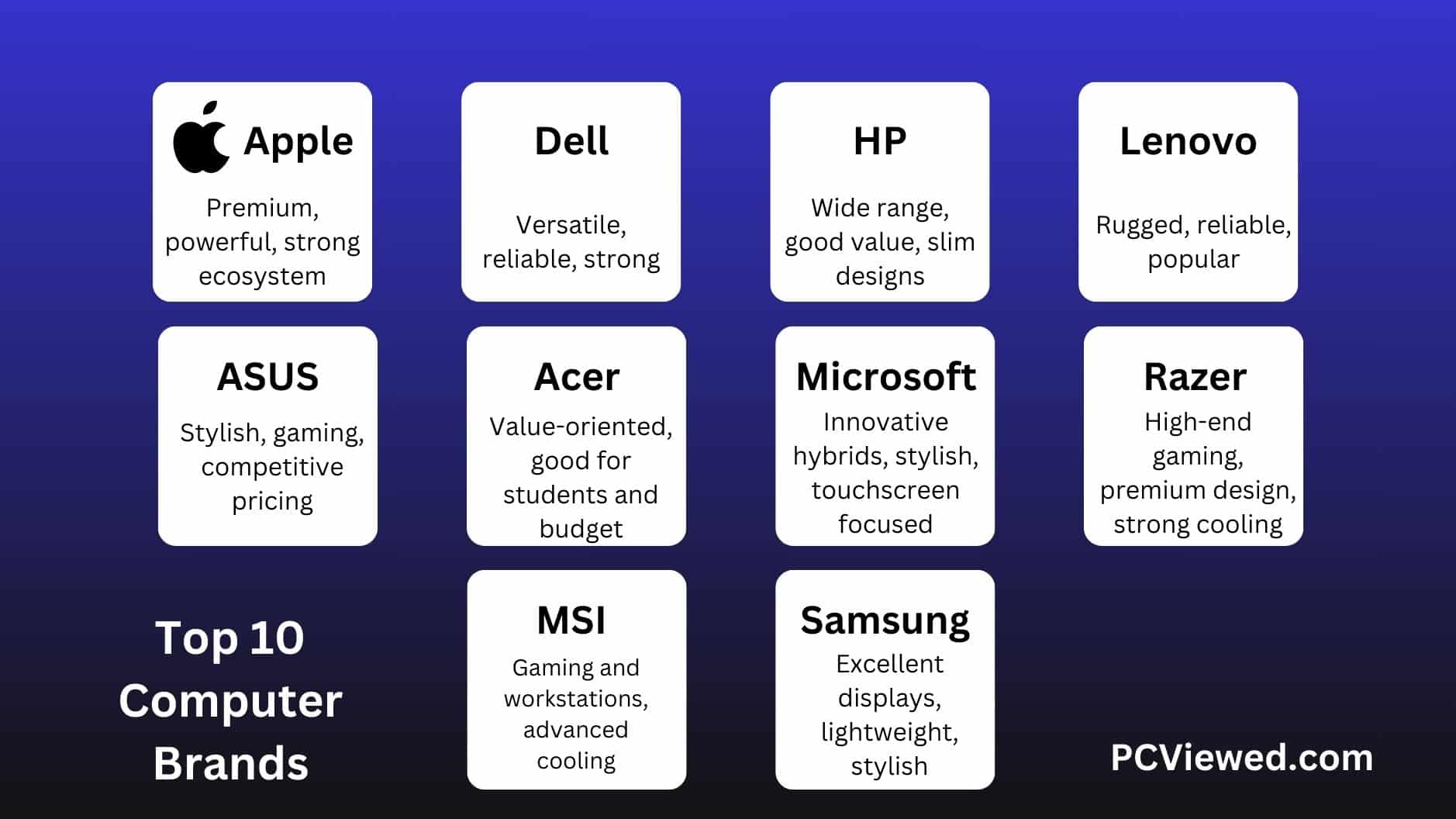
Brand matters:
Brands do matter for a laptop not only because of the possibility of impacting performance but also because of customer support, which is usually much better with better brands. If something goes wrong with them, these might also provide proper aid.
Creative professionals would really require these powerful MacBooks from Apple. For general use and business work, Dell and HP will work pretty well because of their good build quality and reliable performance.
Asus and Lenovo enjoy excellent student- and budget-friendly laptops; these don’t give up functionality because of affordability. The budget-friendly models offered by Acer can be used for casual users requiring a decent laptop that might fulfill their purpose.
How do I decide what laptop to buy?
Determine your primary use case (e.g., casual, student, gaming, or professional editing).
Prioritize the core components like CPU, GPU, RAM, and display specifications, based on that specific need. This prevents you from overspending on features you won’t use or underbuying a machine that will quickly feel slow.
What are the five key factors to consider when buying a laptop?
The five most important factors are:
CPU (Processor): Choose core count and clock speed based on your main tasks (e.g., i3/Ryzen 3 for casual, i5/Ryzen 5 for students, i7/Ryzen 7+ for power users).
RAM (Memory): Essential for multitasking. Aim for 8GB (basic), 16GB (productivity), or 32GB+ (heavy work/gaming).
SSD (Storage): Crucial for speed (boot times and application loading). Most users need 512GB, while power users/gamers should aim for 1TB+.
GPU (Graphics Card): Integrated is fine for casual use and students. A dedicated GPU (like an Nvidia RTX) is essential for gaming, 3D modeling, and video editing.
Display: Consider the panel type (IPS/OLED for color), resolution (FHD for balance, 4K for sharpness), and refresh rate (60Hz for office, 144Hz+ for gaming).
Is it better to have more RAM or a faster processor?
Both are vital and perform different roles to make a laptop fast. A good balance is key. A very fast CPU with too little RAM will choke under heavy multitasking, while a large amount of RAM won’t speed up a slow CPU’s core processing power.
What are the best specifications for a laptop?
The “best” specifications depend on your workload. For instance, generally for high-end professional and gaming use the “best” are:
CPU: Intel Core i9 or AMD Ryzen 9 (with high core count and clock speeds).
RAM: 32GB DDR5 or higher.
GPU: High-end dedicated graphics card (e.g., Nvidia RTX 4060 and above).
Storage: 1TB+ NVMe SSD (Gen4/Gen5).
Display: 4K resolution with a high refresh rate (144Hz or higher) and an IPS or OLED panel for superior color and viewing angles.