
Summary:
This article explains what a PC (personal computer) is, how it works, and why it matters. It walks through the history—from 1970s hobby kits to today’s sleek desktops, laptops and gaming rigs—then breaks down the main types of PCs, the key parts inside (CPU, GPU, RAM, storage, motherboard), and the big three operating systems (Windows, macOS, Linux).
Finally, it shows how PCs remain the go-to tool for gaming, work, school and creativity even in the age of phones and tablets.
Definition
Personal computer (PC) is a microcomputer designed for individual use which can perform a variety of everyday tasks like word processing, internet browsing, email, multimedia consumption, and gaming.
Unlike mainframe or supercomputers, personal computers typically consist of a single CPU, memory, storage, and peripherals like a monitor, keyboard, and mouse.
How does a PC work?
A personal computer is a type of computer that often falls under the microcomputer category, so it works just like all other computers.
According to Roger Young’s book “How Computers Work”, a computer is a machine made of simple switches. It works by taking instructions and data from Memory (Input), using a Processor (CPU) to execute those instructions through electrical circuits, and returning the results back to Memory (Output/Storage).
So, the simplest definition of a PC’s job is processing and storing data.
Here is how it works:
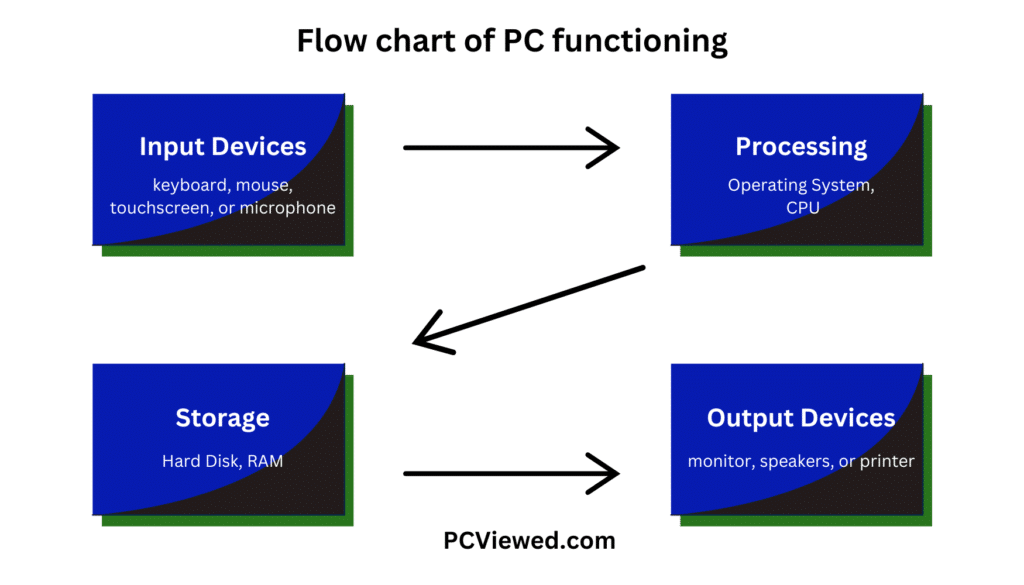
The following are the four main functions of a computer:
- Data Input: This is the first function a computer performs. Input is the process of placing data and instructions into the Memory so that the processor can access them. Data is entered through input devices such as a keyboard, mouse, and other peripherals or using Artificial Intelligence (AI) tools.
- Data Processing: This is the core function of a computer. The input data is processed to convert it into meaningful information. This task is primarily handled by the Central Processing Unit (CPU). The CPU (Processor) uses logic gates and registers for calculations.
- Data Output: In this stage, the processed data is transformed into useful information for the user. The information is presented through output devices such as monitors, printers, speakers, and other display tools.
- Data and Information Storage: The final function of a computer is to store data and information. Processed information is saved in the computer’s memory and stored on its storage devices for future use.
Types of PCs: Different machines for different needs
Now let’s talk about types of personal computers.
Desktops: The traditional workhorse
Desktops are what most people envision when they think of a PC.
A desktop is a type of personal computer designed to be used at a desk, usually consisting of a separate monitor, keyboard, and other components.
They are one of the largest stationary computers, comprising different parts including a tower (often called CPU), or simply the actual computer, a monitor, a keyboard, and a mouse.
What makes a desktop great is power and upgradability. Parts such as the CPU or the GPU can be replaced or upgraded with ease to keep your machine running at its best.
Desktops are preferred by professionals, gamers, and any user who requires a hard, robust computer. They provide the most extensive options in terms of customization, and you can build your own PC if you desire to do so.
Laptops: Where portability and power come together
A laptop is another type of personal computer, which is a portable device that is small and light enough to rest on a user’s lap. In this type of PC, screen, keyboard, and internal components are integrated into a single device.
Laptops gather all the functionality of a desktop and pack it into a portable device. Unlike desktops you can work or play from almost anywhere on your laptop.
Laptops are ideal for students and professionals who work from anywhere and want the convenience of mobility. With the rise of the Ultrabook, described as super-slim and remarkably light yet powerful, many are convinced that they do not need a separate desktop anymore.
Gaming PCs: Built for performance
Gaming PCs are personal computers which are which are designed specifically for today’s most demanding video games, requiring high-end graphics cards (GPUs), fast processors (CPUs), and an abundance of RAM.
These machines are the Ferraris in the computing world, built to go very fast with high frame rates and clear visuals.
Other than mainframe computers, high-end gaming PCs showcase advanced technology. They feature fast processors, powerful graphics cards, and large storage capacities often a couple of terabytes in NVMe SSDs, which are among the fastest types of memory.
Gaming PCs are highly customizable. Each component, from the GPU and CPU to cooling systems and storage, is selected individually to meet the user’s specific needs.
Workstations: Professional PCs
Workstations are also personal computers which are primarily designed for professional work the demands serious computing powers. Whether it’s video editing, rendering of 3D graphics, or a scientific simulation running, a workstation does all that and much more.
Workstations are used in most industries, such as film production, architecture, engineering, and graphic design.
To all external appearances, they do look like desktops but have their internal components optimized for specific professional applications.
Mini PCs and All-in-One PCs
Mini PCs are small personal computers that can fit easily on a desk or behind a monitor; surprisingly for their size, they are pretty powerful.
These are perfect for simple tasks such as web browsing, watching movies, or running light office applications.
All-in-One PCs, by integrating both the monitor and computer in one single unit, help eliminate clutter. These are mostly used where there is a problem of space; these include small offices or even in classrooms.
Though not meant to be as heavily upgradeable as desktops, they are way more streamlined and neat.
Key elements of a PC:
A PC can come in all shapes and sizes—a big, boxy tower. But underneath, it’s a sophisticated machine made up of several key elements.
Each of these pieces works together to ensure that your PC is capable of doing a wide range of things quickly and efficiently.
Central processing unit (CPU): The brain of the PC
The CPU is like the brain of the computer; it executes the instructions and calculations encountered in a computer.
Each time you click on a program or open up a file, it’s really the CPU that gets the work done. The higher the speed of your CPU, the faster it will make your computer execute tasks on your computer.
Measured in cores and threads, the number of cores dictates the capability of a CPU to deal with multiple tasks concurrently—this being a significant necessity in video editing and gaming applications.
The most dominating competition in CPUs is between Intel and AMD, although most users tend to favor Intel’s Core i7 and i9 variants and the series offered by AMD in Ryzen.
Graphics processing unit (GPU): For totally awesome visuals
The GPU is responsible for executing images and videos. High performers such as gamers, video editors, and animators depend on enhanced graphical performance in order to operate flawlessly.
For professionals working in graphics-laden applications, top-end GPU units such as NVIDIA’s RTX series or AMD’s Radeon series of GPU are very paramount.
In practice, there are several other non-traditional applications of GPUs, including machine learning and cryptocurrency mining, where their strengths in parallel processing are well utilized.
Random Access Memory (RAM): Short-Term Memory
RAM is the short-term memory for your computer. When you work with various applications on a computer or handle large files, the data are kept in the RAM so that the CPU can easily access them as fast as possible.
Increased RAM enables the user to handle multitasking without slowing down the computer.
Storage: Where data lives
Storage on your PC is a non-volatile memory where all your files and programs are stored.
Of all types, this consists of two broad categories: hard disk drives (HDDs) and solid state drives (SSDs).
HDDs are slower but cheaper.
SSDs, on the other hand, are much faster; they boot your computer and load programs in a fraction of the time as they do not have any moving parts.
Motherboard: The heart of the PC
All the parts of your computer come together on the motherboard. It is that which connects the CPU, RAM, GPU, and all the storage so they can communicate and function for what they were intended to do.
The structure of the motherboard contains some additional components, such as the BIOS, which is necessary for the working of the PC, and, to some extent, ports (USB, Ethernet, etc.) and audio in/out ports.
Power supply unit (PSU):
No part of the system would function without power. The power supply unit is the one that supplies electricity to all the parts of the computer.
Having a good PSU is important, especially for high-performance PCs, because this guarantees every part of the component gets a steady power supply.
Input/Output devices:
Your keyboard and mouse are input devices since they let you interact with the computer, and your monitor is an example of an output device since it displays the output of the computer’s operations. Some other peripherals may include printers, external storage, and even VR headsets.
PC Operating Systems: Giving life to your machine
All the hardware discussed up until now makes up the physical body of the PC, but it is the software that brings it to life.
Importantly, there is one main piece of software known as the Operating System (OS).
This OS controls and manages every single part of the hardware and other software installed on your computer.
This way, you can employ a friendly interface with the machine, which allows you to interact with it and manage resources to enable all of your programs to run smoothly.
Windows: The Industry Standard
Windows was developed by Microsoft in November 20, 1985 and now is the most widely used operating system across the world.
Most PCs are running Windows due to its wide compatibility with software and hardware.
macOS: Apple’s sleek offering
If you own an Apple Mac, you must be running macOS. macOS was introduced in 1984 and is a clean and secure operating system optimized for creative work: video editing, music production, and graphic design.
Linux: For the tinkerers
Linux is a family of open-source, Unix-like operating systems built around the Linux kernel, first released in 1991 by Linus Torvalds.
Essentially, Linux can be a flexible, extremely powerful system, and what makes it stand out is that it is free and open-source, implying that anybody can access, modify, and distribute it.
This flexibility is a giant reason why Linux is found almost everywhere today, from servers running websites to desktop computers and even embedded systems like routers or smart devices.
What’s really cool about Linux is that it has many different versions called distributions (distros). Each distro is designed to meet specific user needs.
For example, there is Ubuntu, which pays much attention to usability and is good for beginners; Fedora comes as a cutting-edge offering to developers, while Linux Mint is lightweight and user-friendly, hence highly recommended for use in everyday situations.
Many developers, programmers, and users of PCs use this operating system.
A journey through time: History of PCs
PCs hadn’t always looked like they do now, of course. PCs have undergone a remarkable transformation from simple hobbyist building kits to today’s powerful machines, showcasing significant advancements in technology and design over the decades.
Early History of Computers: How It All Started and Led to PCs
Computers have a very long history. The first known calculating device is the abacus, likely of Babylonian origin, which was in use as early as 1100 BCE and is still used in some Asian countries.
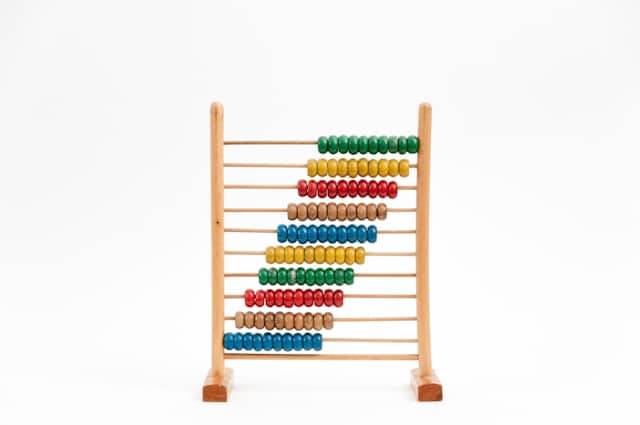
According to history, the abacus is considered the ancestor of the modern calculating machine and computer.
The evolution of calculating devices took a leap after the discovery of logarithms in 1614.
For example, Blaise Pascal invented the Pascaline in 1642, which could efficiently add and subtract large numbers.
But it did not stop there. Just a few decades later, around 1673, Gottfried Wilhelm Leibniz invented the Leibniz Calculator, also known as the Stepped Reckoner. It could perform all four basic arithmetic operations: addition, subtraction, multiplication, and division.
In 1820, Charles Xavier Thomas invented the Thomas Arithmometer, the first commercially produced mechanical calculator.
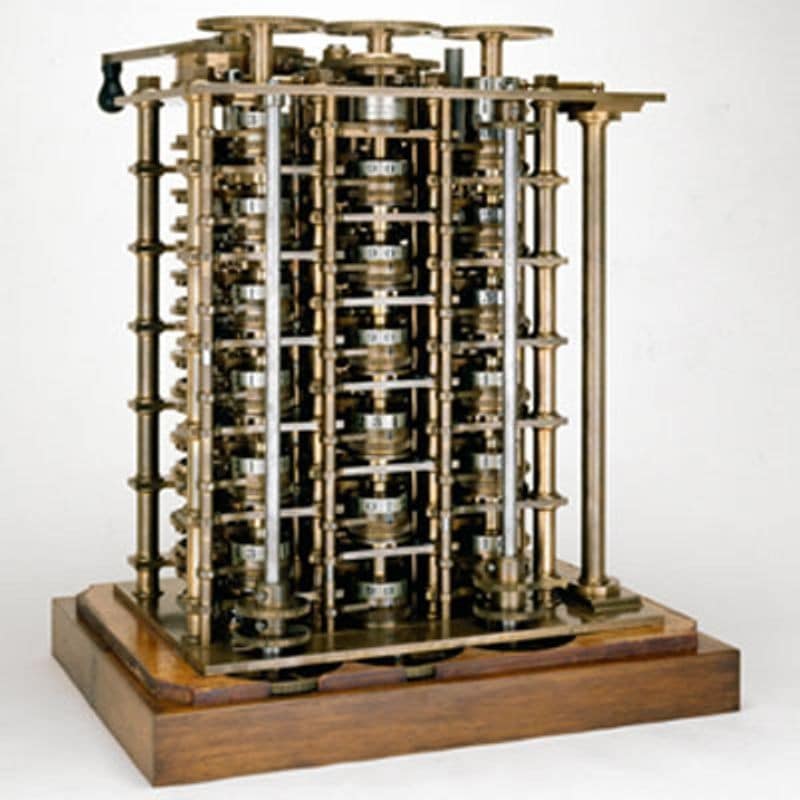
Finally, these innovations paved the way for the automatic calculating machine called the Difference Engine, which was essentially the predecessor of the modern computer. It was capable of automatically calculating and printing mathematical tables.
PCs’ early era: 1970s-1980s
Personal computing didn’t even have a beginning in the way we think about it today; it began with hobbyists building kits around simple electronics called the Altair 8800 in the 1970s.
All that existed was a series of lights and switches because it did not have a screen or keyboard.
Yet, with that simple piece of technology, the foundation for the personal computing movement was laid.
Computers were, at that time very big, expensive machines that only businesses or research stations could afford.
Then, in 1977, came the Apple II, which had an integrated keyboard and could display color graphics and applications suitable for daily users.
It was in the year 1981 that IBM introduced its IBM PC, which very soon became the industry standard for personal computers.
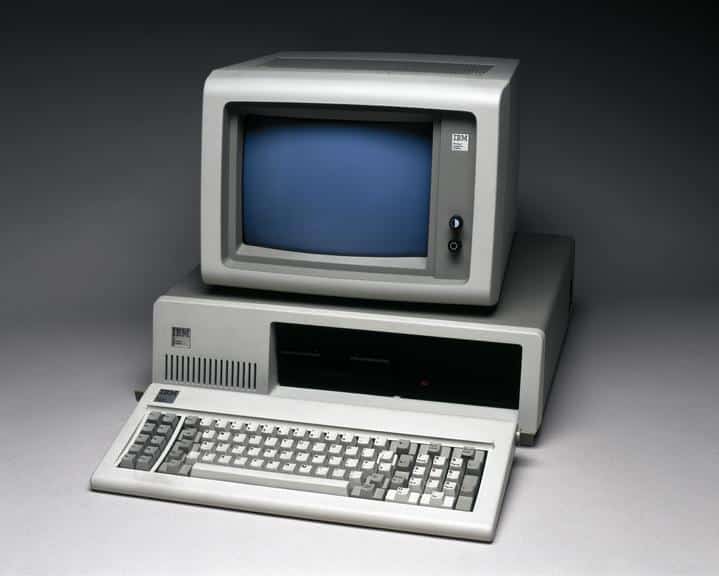
The term “PC” actually comes from IBM’s naming convention. Because of IBM’s open architecture, it allowed other manufacturers to clone their designs, which created an explosion in the market for affordable personal computers.
Apple’s revolution: The Macintosh (1984)
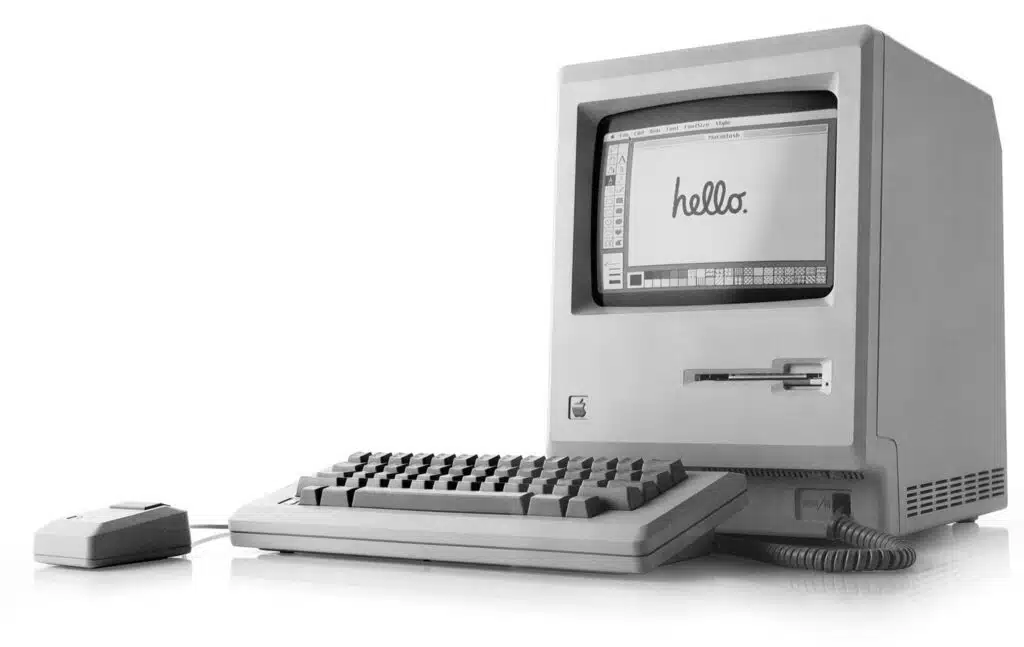
By no means did Apple rest on its laurels while IBM was in such command of the market.
In the year 1984, they came out with the Apple Macintosh, a computer that began using a Graphical User Interface, where users can click on icons and interact with the computer by visual means rather than writing commands on the keyboard.
Its iconic launch commercial during the Super Bowl made Apple paint itself as a rebel in the computing world.
The Mac revolutionized personal computing by making it accessible and extremely easy to use for nontechnical folks. It introduced the mouse as a primary input device. A device that most PCs use today as an extra.
The Age of Windows and software wars (1990-2000)
When Apple was wowing people with the ease of use of its interface, Microsoft was busily working on its very own version of an operating system.
And in 1985, it finally came out with what would be the first version: Windows 1.0.
It became, with time and input from its users, Windows 95—the actual one that made PCs mainstream among most people. Windows dominated because it was compatible with a wide range of hardware.
The PC industry boomed in the 1990s.
Computers became more affordable and began entering homes around the world.
The widespread use of the internet in the late ’90s and early 2000s merely served to accelerate this trend. Email, web browsing, and even other sorts of multimedia software such as Microsoft Office became daily tools for work and play.
Modern PCs: Sleek, powerful, and everywhere (2010s-Present)
Fast-forward to the present, and PCs are ubiquitous. Modern PCs now have solid-state drives for faster bootup times, high-end graphics processing units, or GPUs, CPUs, and sleek, slim designs for portability.
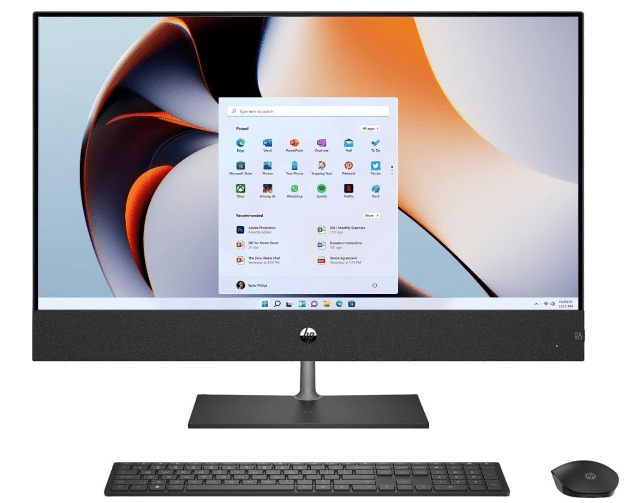
The ultrabook and gaming PC markets exploded, offering consumers a wide range of machines tailored to different needs. This is critical since most of us spend our days glued to the screens of our PCs for work and other activities.
How many types of PCs are there?
There are many types of PCs including desktops, laptops, gaming PCs, workstation and all-in-ones.
What is the first name of a personal computer?
The Kenbak-1, introduced in 1971, is technically the first personal computer but as it had a very limited capabilities and quite a few units were produced that’s why the Altair 8800 (1975) is widely known as the first persona computer which used a real microprocessor (Intel 8080).
What does PC stand for in computer?
The term PC stands for personal computer.
